kangsuper
Tampilkan postingan dengan label spd. Tampilkan semua postingan

Senin, 28 Oktober 2019

BYPASS FRP & FLASH Advan i7U G711A_L68

pass: i-7uadvok


FRP Advan i7u ini mencegah pengguna yang tidak sah dari Mengakses atau menggunakan perangkat Anda jika telah ulang ke pengaturan pabrik tanpa izin Anda (misalnya, jika perangkat hilang atau dicuri)

Mohon digunakan dengan bijaksana, jangan digunakan pada hp curian. thx

Patch Level    : NRD90M
Display ID     : i7U_SL718A_V1.0_20180410
Ver. CodeName  : REL
Ver. Release   : 7.0
Sec. Patch     : 2017-12-05
Build Time     : 1523356407
Product Model  : i7U
Product Brand  : ADVAN
Product Name   : i_Lite
Product Device : ADVAN_i_Lite
Product Board  : sp9850ka_1h10
Product Manfct : ADVAN
Board Platform : sp9850ka
Product Info   : sp9850ka_1h10


A. BYPASS FRP ONLY ukuran PAC 1 MB

  1. Download Firmware PAC_Advan i7U_BYPASS_FRP_only  atau  Download Disini (1MB)
 B. Firmware PAC FULL
  1. Download FULL PAC sp9850ka_1h10_Advan_i7U_SL718A_V1.0_20180508 atau Download disini


Tool :
  1. Download SPD_Upgrade_Tool_R4.0.0001 atau Download Disini
  2. Tutorial Flash via research here
  3. Driver SPD by InfinityBox
  4. Konfirmasi pass WA / sms only 0822-1163-1565 (nomor ini hanya buat konfirmasi, BUKAN YANG DI ISI) , Mahar SHOPEE PAY / GOPAY 20k

Cara Kerja :
  • Untuk FRP Evercoss Advan i7U tinggal pake PAC BYPASS FRP ONLY, tinggal load PAC file, flash, 5dtk done
  • Boot volume (+/-)

 Operation : Identify [ v2.00r2 ]

1. Power off device, wait 10-15 seconds
2. Press and hold BooKey ( 1 : BOTH VOL , 2 : VOL+ , 3 : VOL- )
3. Insert cable in device!

Wait for device ...

Device Connected!
BootVersion : SPRD3
Boot : PAC : sp9850ka_1h10_Advan_i7U_BYPASS_FRP_LOCK.pac
Sending Init Boot ...
Boot sent!
Kick FDL ...
BootVersion : Spreadtrum Boot Block version 1.1
Protocol setup ...
Port speed : 921600
Sending Flash Boot ...
Boot sent!
Kick FLASH FDL ...
FDL : Control transfered!

Boot Done!

Device info :
Patch Level    : NRD90M
Display ID     : i7U_SL718A_V1.0_20180410
Ver. CodeName  : REL
Ver. Release   : 7.0
Sec. Patch     : 2017-12-05
Build Time     : 1523356407
Product Model  : i7U
Product Brand  : ADVAN
Product Name   : i_Lite
Product Device : ADVAN_i_Lite
Product Board  : sp9850ka_1h10
Product Manfct : ADVAN
Board Platform : sp9850ka
Product Info   : sp9850ka_1h10


Done!
Elapsed: 00:06:31


Senin, 14 Oktober 2019

Flash & Bypass FRP Evercoss GENPRO S55B


 FRP Evercoss S55B ini mencegah pengguna yang tidak sah dari Mengakses atau menggunakan perangkat Anda jika telah ulang ke pengaturan pabrik tanpa izin Anda (misalnya, jika perangkat hilang atau dicuri)

Mohon digunakan dengan bijaksana, jangan digunakan pada hp curian. thx

Loading    : sp9850ka_1h10_Evercoss_S55B_7.0_V06_20180201.pac
CRVersion  : BP_R1.0.0
PacCPUinfo : sp9850ka_1h10
PacVersion : V06_20180201
FastCheck  : 0x00BACB0394

pass :    ecs-50joss

 
A. BYPASS FRP ONLY ukuran PAC 1 MB

  1. Download Firmware Evercoss_S55B_BYPASS_FRP_plus_lock  atau  Download Disini (1MB)
 B. Firmware PAC FULL
  1. Download FULL PAC Evercoss_S55B_7.0_V06_20180201 atau Download disini


Tool :
  1. Download SPD_Upgrade_Tool_R4.0.0001 atau Download Disini
  2. Tutorial Flash via research here
  3. Driver SPD by InfinityBox
  4. Konfirmasi pass sms/wa only 0822-1163-1565 (nomor ini hanya buat konfirmasi, BUKAN YANG DI ISI) , Mahar pulsa 20k

Cara Kerja :
  • Untuk FRP Evercoss GENPRO S55B tinggal pake PAC BYPASS FRP ONLY, tinggal load PAC file, flash, 5dtk done
  • Boot volume (+-)


 Loading    : sp9850ka_1h10_Evercoss_S55B_7.0_V06_20180201.pac
CRVersion  : BP_R1.0.0
PacCPUinfo : sp9850ka_1h10
PacVersion : V06_20180201
FastCheck  : 0x00BACB0394

Loading files ...

File : fdl1-sign.bin
File : fdl2-sign.bin
File : sharkl2_pubcp_nvitem.bin
File : prodnv.img
File : u-boot-spl-16k-sign.bin
File : SC9600_sharkl2_pubcp_modem-sign.dat
File : sharkl2_pubcp_deltanv.bin
File : sharkl2_pubcp_LTEA_DSP-sign.bin
File : sharkl2_pubcp_DM_DSP-sign.bin
File : sharkl2_arm7-sign.bin
File : EXEC_KERNEL_IMAGE.bin
File : boot-sign.img
File : recovery-sign.img
File : sysinfo.img
File : system.img
File : userdata.img
File : FWVGA_logo_256_td.bmp
File : fastboot_FWVGA_logo_256_td.bmp
File : cache.img
File : tos-sign.bin
File : sml-sign.bin
File : u-boot-sign.bin
File : persist.img
File : sp9850ka_1h10.xml

Load Ok!

Sabtu, 21 September 2019

Flash & Firmware Axioo AX7 S5T Tablet ~ STOCK ROM


Model Name  : Axioo_AX7
Model Brand : Axioo
Model Device: Axioo_AX7
AndrVersion : 6.0
BaseBand CPU: SP9832A_2H11_VOLTE
Project Ver : Axioo_S5T_GSC0_SW20171108
Model Ext   : Axioo_AX7

pass:   s5-taxiojoss


Tool & Bahan :
  1. Download Firmware PAC Axioo AX7 S5T Tablet atau Download Disini
  2. Download SPD_Upgrade_Tool_R4.0.0001 Download Disini
  3. Tutorial Flash via research here
  4. Driver SPD by InfinityBox
  5. Konfirmasi pass sms/wa only 0822-1163-1565 (nomor ini hanya buat konfirmasi, BUKAN YANG DI ISI) , Mahar pulsa 20k
Cara Kerja :
- Boot Volume (+-)

Cara Flash AXIOO AX7 S5T via Research Download

Log Read Firmware Axioo S5T
Operation : Read FullFlash [ v1.27 ]

1. Remove battery. Insert battery back
2. Press and hold 'VolumeUp' and 'VolumeDown' keys
 -> Alternative : just ONE 'VolumeUp' or 'VolumeDown' key
3. Insert cable

 ====  Wait for phone...

Phone found! [ 6 ]
Port Opened
Sync...
InitBoot Done [ 0x81 ] , Ver : SPRD3
Sync...
Sending FDL
[Info] : If SW freeze here more, than 15 seconds - remove cable
PickUp loaders from pac
FDL Ready!
Boot Ver : Spreadtrum Boot Block version 1.1
Sending FLASH FDL
FLASH FDL Ready!
Boot Ok!

FlashMode Set : Ok!
Detected eMMC Flash , Structure detect Ok!

[FW_READER] : Prepare Ok!
- > Wait phone connected ...

Phone found! [ 6 ]
Port Opened
Sync...
InitBoot Done [ 0x81 ] , Ver : SPRD3
Sync...
Sending FDL
[Info] : If SW freeze here more, than 15 seconds - remove cable
PickUp loaders from pac
FDL Ready!
Boot Ver : Spreadtrum Boot Block version 1.1
Sending FLASH FDL
FLASH FDL Ready!
Boot Ok!

- > Wait phone connected ...

Phone found! [ 6 ]
Port Opened
Sync...
InitBoot Done [ 0x81 ] , Ver : SPRD3
Sync...
Sending FDL
[Info] : If SW freeze here more, than 15 seconds - remove cable
PickUp loaders from pac
FDL Ready!
Boot Ver : Spreadtrum Boot Block version 1.1
Sending FLASH FDL
FLASH FDL Ready!
Boot Ok!

Model Name  : Axioo_AX7
Model Brand : Axioo
Model Device: Axioo_AX7
AndrVersion : 6.0
BaseBand CPU: SP9832A_2H11_VOLTE
Project Ver : Axioo_S5T_GSC0_SW20171108
Model Ext   : Axioo_AX7

[Read Mode] : HSUSB : 0x3000

[FW_READER] : Reading Firmware Now ...

[Read Ok] : u-boot-spl-16k.bin
[Read Ok] : u-boot.bin
[Read Ok] : prodnv.img
[Read Ok] : nvitem_l.bin
[Read Ok] : sharkl_cp1.bin
[Read Ok] : DSP_DM_Gx.bin
[Read Ok] : DSP_DM_Gx.bin
[Read Ok] : l__WPH_arm7.bin
[Read Ok] : PM_arm7_sys.bin
[Read Ok] : logo_600x1024.bin
[Read Ok] : fblogo_600x1024.bin
[Read Ok] : wcn_fdl.bin
[Read Ok] : AA_MARLIN.bin
[Read Ok] : boot.img
[Read Ok] : system.img
[Read Ok] : sysinfo.img
[Build Ok] : cache.img
[Read Ok] : recovery.img
[Build Ok] : userdata.img

AndroidInfo created
Firmware Size : 2102 MiB
Saved to : D:\axioo\axioo s5t\stock rom axioo s5t\SP9832A_2H11_VOLTE_Axioo_AX7_6.0_Axioo_S5T_GSC0_SW20171108_Axioo_AX7\
Done! 


Sabtu, 25 Mei 2019

BYPASS FRP & Firmware Maxtron Diamond SC7731C & SC7731G


Device Brand   : MAXTRON-DIAMOND
Device Model   : sp7731gea_z2_ype_m509_qhd
Device CPU     : sp7731gea_hd
Device IntName : sp7731gea_z2_ype_m509_qhd
Device Version : 5.1.1
Device Compile : 11/26/2016 3:07:37 AM
Device Project : Z2_KW_YPE_M509_MAXTRON_QHD_V1.0_20161126
Device ExtInfo : MAXTRON-DIAMOND
pass:   maxdia-mond
Bahan :
1. Bypass FRP Only :
2. Firmware Maxtron Diamond PAC Full


Tool  :
  1. Download SPD_Upgrade_Tool_R4.0.0001 Download Disini
  2. Tutorial Flash via research here
  3. Driver SPD by InfinityBox
  4. Konfirmasi pass sms/wa only 0822-1163-1565 (nomor ini hanya buat konfirmasi, BUKAN YANG DI ISI) , Mahar pulsa 20k

Cara Kerja :
  • untuk frp, bila tidak cocok pake versi satunya
 Flash Maxtron V15 via Research Download


Device Brand   : MAXTRON-DIAMOND
Device Model   : sp7731gea_z2_ype_m509_qhd
Device CPU     : sp7731gea_hd
Device IntName : sp7731gea_z2_ype_m509_qhd
Device Version : 5.1.1
Device Compile : 11/26/2016 3:07:37 AM
Device Project : Z2_KW_YPE_M509_MAXTRON_QHD_V1.0_20161126
Device ExtInfo : MAXTRON-DIAMOND

Selasa, 30 April 2019

Firmware & Flash Axioo PICOpad 7H2 / PICOpad_S2L


Model Name  : PICOpad_7H2
Model Brand : Axioo
Model Device: PICOPad_7H2
AndrVersion : 5.1
BaseBand CPU: AXIOO
CompileDate : 5/6/2016 3:51:44 AM
Project Ver : PICOpad_S2L_CGS_SW_20160506
Model Ext   : PICOpad 7H2 7H(7 3G)

PASS AXIO 7H : (Template 7H)

NusaNtara4@&?deron99 =>7H 6572 (T)

axioo7h6582 =>4S7H 6582

axio7hs1 =>7H S1


Tool & Bahan :

  1. Download Firmware PAC AXIOO PICOPAD 7H2 atau Download Disini
  2. Download SPD_Upgrade_Tool_R4.0.0001 Download Disini
  3. Tutorial Flash via research here
  4. Driver SPD by InfinityBox
  5. Konfirmasi pass sms/wa only 0822-1163-1565 (nomor ini hanya buat konfirmasi, BUKAN YANG DI ISI) , Mahar pulsa 20k
Cara Kerja :
- Boot Volume (-)

Cara Flash AXIOO PICOPAD 7H2 via Research Download


Log Read Info AXIOO PICOPAD 7H2
Operation : Check/Read Info [ v1.27 ]

1. Remove battery. Insert battery back
2. Press and hold 'VolumeUp' and 'VolumeDown' keys
 -> Alternative : just ONE 'VolumeUp' or 'VolumeDown' key
3. Insert cable

 ====  Wait for phone...

Phone found! [ 5 ]
Port Opened
Sync...
InitBoot Done [ 0x81 ] , Ver : SPRD3
Sync...
Sending FDL
[Info] : If SW freeze here more, than 15 seconds - remove cable
FDL Ready!
Boot Ver : SPRD 773x eMMC loader v3 Infinity
Sending FLASH FDL
FLASH FDL Ready!
Boot Ok!

FLASH : eMMC Flash , Structure : Ok!

Reading extended info ...

Model Name  : PICOpad_7H2
Model Brand : Axioo
Model Device: PICOPad_7H2
AndrVersion : 5.1
BaseBand CPU: AXIOO
CompileDate : 5/6/2016 3:51:44 AM
Project Ver : PICOpad_S2L_CGS_SW_20160506
Model Ext   : PICOpad 7H2 7H(7 3G)

ExtraInfo : HWInfo not exists, normal phone

Elapsed: 00:00:12 


Sabtu, 20 April 2019

Flash & Firmware Maxtron V15 SPD

Model Name  : V15
Model Brand : MAXTRON
Model Device: V15
AndrVersion : 7.0
BaseBand CPU: MAXTRON
Project Ver : 7731C_FS286_XDH_M123B_V15_V06_64X8_PLS_2SIM_20171206_0932
Model Ext   : V15

Tool & Bahan :
  1. Download Firmware PAC Maxtron V15  SC7731C_FS286_XDH_M123B_V15_V06 atau Download Disini
  2. Download SPD_Upgrade_Tool_R4.0.0001 Download Disini
  3. Tutorial Flash via research here
  4. Driver SPD by InfinityBox
  5. Konfirmasi pass sms/wa only 0822-1163-1565 (nomor ini hanya buat konfirmasi, BUKAN YANG DI ISI) , Mahar pulsa 20k
Cara Kerja :
- Boot Volume (-)

Cara Flash Maxtron V15 via Research Download


Log Read Firmware Maxtron V15 
Operation : Read FullFlash [ v1.27 ]

1. Remove battery. Insert battery back
2. Press and hold 'VolumeUp' and 'VolumeDown' keys
 -> Alternative : just ONE 'VolumeUp' or 'VolumeDown' key
3. Insert cable

 ====  Wait for phone...

Phone found! [ 12 ]
Port Opened
Sync...
InitBoot Done [ 0x81 ] , Ver : SPRD3
Sync...
Sending FDL
[Info] : If SW freeze here more, than 15 seconds - remove cable
FDL Ready!
Boot Ver : SC773x eMMC Loader v7 InfinityBox
Sending FLASH FDL
FLASH FDL Ready!
Boot Ok!

FlashMode Set : Ok!
Detected eMMC Flash , Structure detect Ok!

[FW_READER] : Prepare Ok!
- > Wait phone connected ...

Phone found! [ 12 ]
Port Opened
Sync...
InitBoot Done [ 0x81 ] , Ver : SPRD3
Sync...
Sending FDL
[Info] : If SW freeze here more, than 15 seconds - remove cable
FDL Ready!
Boot Ver : SC773x eMMC Loader v7 InfinityBox
Sending FLASH FDL
FLASH FDL Ready!
Boot Ok!

- > Wait phone connected ...

Phone found! [ 12 ]
Port Opened
Sync...
InitBoot Done [ 0x81 ] , Ver : SPRD3
Sync...
Sending FDL
[Info] : If SW freeze here more, than 15 seconds - remove cable
FDL Ready!
Boot Ver : SC773x eMMC Loader v7 InfinityBox
Sending FLASH FDL
FLASH FDL Ready!
Boot Ok!

Model Name  : V15
Model Brand : MAXTRON
Model Device: V15
AndrVersion : 7.0
BaseBand CPU: MAXTRON
Project Ver : 7731C_FS286_XDH_M123B_V15_V06_64X8_PLS_2SIM_20171206_0932
Model Ext   : V15

[Read Mode] : HSUSB : 0x3000

[FW_READER] : Reading Firmware Now ...

[Read Ok] : u-boot-spl-16k.bin
[Read Ok] : u-boot.bin
[Read Ok] : prodnv.img
[Read Ok] : sc7731C_CP0_modem.bin
[Read Ok] : DSP_DM_Gx.bin
[Read Ok] : nvitem_w.bin
[Read Ok] : sc8830g_modem_CP2_WCN_Trunk_W17.27.4_Release.bin
[Read Ok] : nvitem_wcn.bin
[Read Ok] : logo_480x854.bin
[Read Ok] : fblogo_480x854.bin
[Read Ok] : boot.img
[Read Ok] : system.img
[Read Ok] : trustos.bin
[Read Ok] : vmm.bin
[Read Ok] : sysinfo.img
[Build Ok] : cache.img
[Read Ok] : recovery.img
[Read Ok] : fbootlogo3.bin
[Read Ok] : fbootlogo4.bin
[Read Ok] : fbootlogo5.bin
[Build Ok] : userdata.img

AndroidInfo created
Firmware Size : 2537 MiB
Saved to : D:\maxtron\maxtron v15\New folder\MAXTRON_V15_7.0_7731C_FS286_XDH_M123B_V15_V06_64X8_PLS_2SIM_20171206_0932_V15\
Done!

Elapsed: 00:17:43

Sabtu, 23 Februari 2019

Flash & Firmware Strawberry ST7701 SPD


Model Name  : sp7731g_1h10_hd_oversea
Model Brand : ST7701
Model Device: ST7701
AndrVersion : 6.0
BaseBand CPU: SP7731GEA_HDR
Project Ver : FS066_CF8_LS019_ST7701_L12819_16B
Model Ext   : ST7701

Tool & Bahan :
  1. Download Firmware PAC Strawberry ST 7701 FS066_CF8_LS019_ST7701_L12819_16B  atau Download Disini
  2. Download Firmware PAC Strawberry ST 7701  SP7731GEA_HDR_ST7701_6.0_LS019_INDB_V02 atau Download Disini
  3. FILE NV ST7701 
  4. Download SPD_Upgrade_Tool_R4.0.0001 Download Disini
  5. Tutorial Flash via research here
  6. Driver SPD by InfinityBox
  7. Konfirmasi pass WA / sms only 0822-1163-1565 (nomor ini hanya buat konfirmasi, BUKAN YANG DI ISI) , Mahar pulsa 20k
Cara Kerja :
- Boot Volume (-)

Cara Flash Strawberry ST7701 via Research Download


Log Read Firmware Strawberry ST7701
Operation : Read FullFlash [ v1.27 ]

1. Remove battery. Insert battery back
2. Press and hold 'VolumeUp' and 'VolumeDown' keys
 -> Alternative : just ONE 'VolumeUp' or 'VolumeDown' key
3. Insert cable

 ====  Wait for phone...

Phone found! [ 14 ]
Port Opened
Sync...
InitBoot Done [ 0x81 ] , Ver : SPRD3
Sync...
Sending FDL
[Info] : If SW freeze here more, than 15 seconds - remove cable
FDL Ready!
Boot Ver : SPRD 773x eMMC loader v3 Infinity
Sending FLASH FDL
FLASH FDL Ready!
Boot Ok!

FlashMode Set : Ok!
Detected eMMC Flash , Structure detect Ok!

[FW_READER] : Prepare Ok!
- > Wait phone connected ...

Phone found! [ 14 ]
Port Opened
Sync...
InitBoot Done [ 0x81 ] , Ver : SPRD3
Sync...
Sending FDL
[Info] : If SW freeze here more, than 15 seconds - remove cable
FDL Ready!
Boot Ver : SPRD 773x eMMC loader v3 Infinity
Sending FLASH FDL
FLASH FDL Ready!
Boot Ok!

- > Wait phone connected ...

Phone found! [ 14 ]
Port Opened
Sync...
InitBoot Done [ 0x81 ] , Ver : SPRD3
Sync...
Sending FDL
[Info] : If SW freeze here more, than 15 seconds - remove cable
FDL Ready!
Boot Ver : SPRD 773x eMMC loader v3 Infinity
Sending FLASH FDL
FLASH FDL Ready!
Boot Ok!

Model Name  : sp7731g_1h10_hd_oversea
Model Brand : ST7701
Model Device: ST7701
AndrVersion : 6.0
BaseBand CPU: SP7731GEA_HDR
Project Ver : FS066_CF8_LS019_ST7701_L12819_16B
Model Ext   : ST7701

[Read Mode] : HSUSB : 0x3000

[FW_READER] : Reading Firmware Now ...

[Read Ok] : u-boot-spl-16k.bin
[Read Ok] : u-boot.bin
[Read Ok] : prodnv.img
[Read Ok] : sc7731g_CP0_modem.bin
[Read Ok] : DSP_DM_Gx.bin
[Read Ok] : nvitem_w.bin
[Read Ok] : sc8830g_modem_CP2_WCN_14D_W16.29.3_Release.bin
[Read Ok] : nvitem_wcn.bin
[Read Ok] : logo_720x1280.bin
[Read Ok] : fblogo_720x1280.bin
[Read Ok] : boot.img
[Read Ok] : system.img
[Read Ok] : sysinfo.img
[Build Ok] : cache.img
[Read Ok] : recovery.img
[Read Ok] : udc_config.bin
[Build Ok] : userdata.img

AndroidInfo created
Firmware Size : 1555 MiB
Saved to : E:\STRAWBERRY\New folder\SP7731GEA_HDR_ST7701_6.0_FS066_CF8_LS019_ST7701_L12819_16B_ST7701\
Done!


Rabu, 11 Juli 2018

Flash & Firmware Strawberry ST9119 ~ SPD SC7731C


Brand           : strawberry
Phone Model     : ST9119
Android Ver     : 6.0
CPU/Processor   : SP7731C_V1.0.0
SPD Project ver : sp7731c_fs285_32v4_project-user 6.0 MRA58K eng.xdbf10.20170909.110020 SW Version      : STRAWBERRY_ST9119_V05_20170909_1059

Bahan :

  1.  Download Firmware PAC Strawberry ST9119 V05 atau  Download Disini
  2.  Download SPD_Upgrade_Tool_R4.0.0001 Download Disini
  3.  Driver SPD by InfinityBox
  4.  Tutorial Flash via research here
  5.  Konfirmasi pass WA / sms only 0822-1163-1565 (nomor ini hanya buat konfirmasi, BUKAN YANG DI ISI) , Mahar pulsa 10k

 Error pada research download baca disini

Firmware Strawberry ST9119 versi lain :

Note :
1. Boot volume +/-

 Cara Flash Strawberry ST9119 via Research Download


Log Read Firmware Strawberry ST9119
Action : Read PAC
 Boot : SC7731C-EMMC
 Tips:
 1.Remove Battery, Insert usb cable, Insert battery
 2.power off Phone, Remove & Reinsert Battery , insert USB Cable
 (In Case Some Phone Required to hold bootkey)
 Waiting for Phone Usb....
 Phone found : SPRD U2S Diag (COM7)
 Connecting...
 Bootstrap: SPRD3
 Connected done.
 sending 1st boot...
 waiting for ack...
 1st boot done.
 Sending 2nd boot...
 2nd boot done.
 Checking H/W report info...
 Read info is done.

 Reading Project Property ...

 Brand           : strawberry
 Phone Model     : ST9119
 Android Ver     : 6.0
 CPU/Processor   : SP7731C_V1.0.0
 SPD Project ver : sp7731c_fs285_32v4_project-user 6.0 MRA58K eng.xdbf10.20170909.110020 release-keys
 SW Version      : STRAWBERRY_ST9119_V05_20170909_1059
 Making dir: E:\andro 1\strawberry\st9119\spd_7731C_EMMC_strawberry_ST9119_Android6.0_STRAWBERRY_ST9119_V05
_20170909_1059_20180628_201506\...[ok]...[ok]...[ok]

 Dumping Flash Image Now...
 Reading splloader...ok
 Reading uboot...ok
 Reading recovery...ok
 Reading system...ok
 Reading userdata...ok
 Reading cache...ok
 Reading misc...ok
 Reading boot...ok
 Reading wmodem...ok
 Reading wdsp...ok
 Reading wfixnv1...ok
 Reading wcnfixnv1...ok
 Reading wcnmodem...ok
 Reading prodnv...ok
 Reading sysinfo...ok
 Reading sysinfo...ok
 Reading logo...ok
 Reading fbootlogo...ok
 Packing ...
 Copying file: splloader...ok
 Copying file: uboot...ok
 Copying file: recovery...ok
 Copying file: system...ok
 Copying file: userdata...ok
 Copying file: cache...ok
 Copying file: boot...ok
 Copying file: wmodem...ok
 Copying file: wdsp...ok
 Copying file: wfixnv1...ok
 Copying file: wcnfixnv1...ok
 Copying file: wcnmodem...ok
 Copying file: prodnv...ok
 Copying file: sysinfo...ok
 Copying file: sysinfo...ok
 Copying file: logo...ok
 Copying file: fbootlogo...ok
 Creating XML Settings ...ok
 Rebuilding Packet Header ...ok
 Deleting TmpDir...ok
 BinPacket saved to: E:\andro 1\strawberry\st9119\CSTool_spd_7731C_EMMC_strawberry_ST9119_Android6.0
_STRAWBERRY_ST9119_V05_20170909_1059_20180628_201506.pac
 All done

 Action completed
 Time taken : 00:16:36


Selasa, 05 Juni 2018

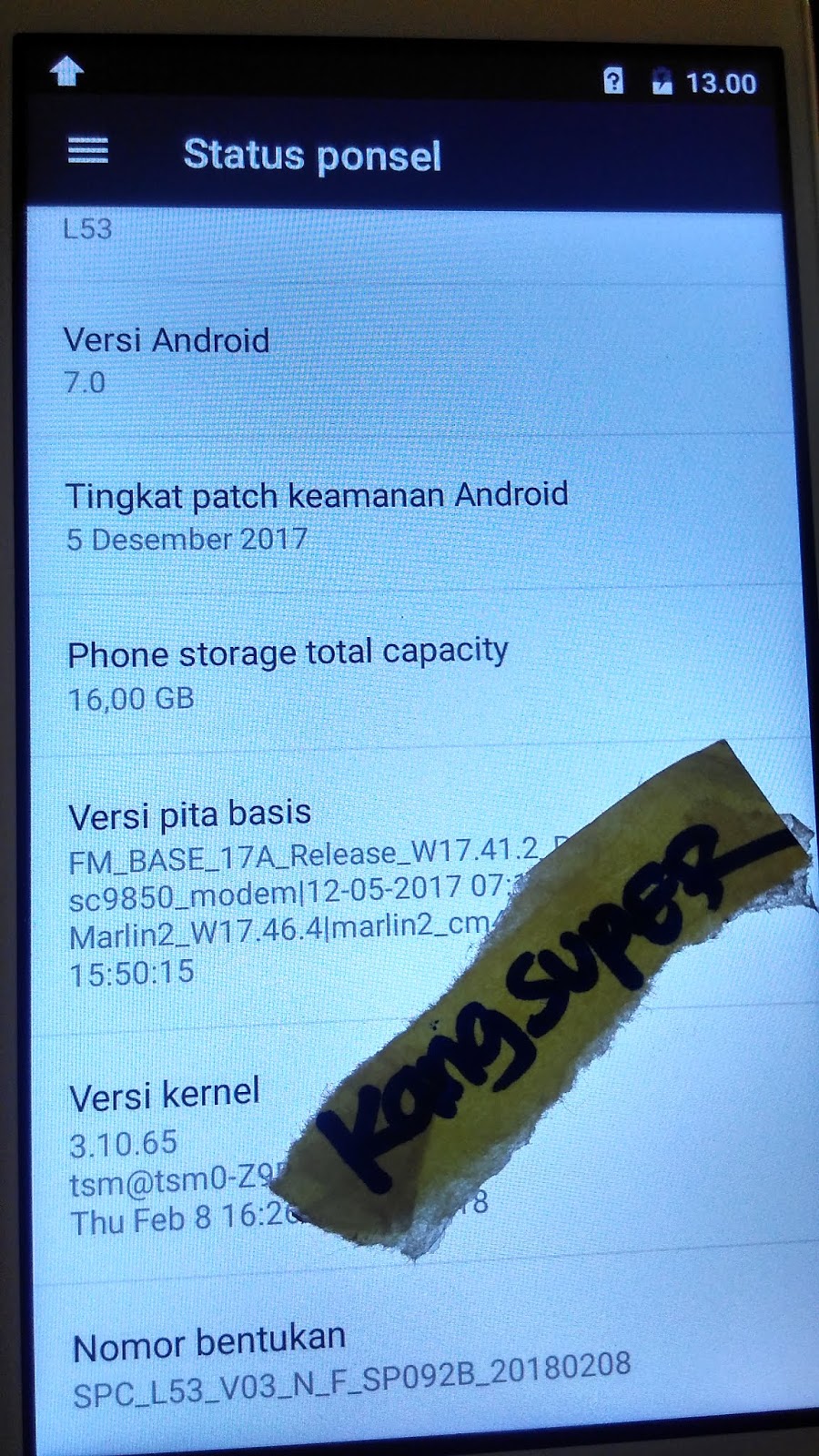
Flash & Bypass FRP SPC L53 MTK & SPD


FRP SPC L53  Verifikasi akun Google ini mencegah pengguna yang tidak sah dari Mengakses atau menggunakan perangkat Anda jika telah ulang ke pengaturan pabrik tanpa izin Anda (misalnya, jika perangkat hilang atau dicuri)
Mohon digunakan dengan bijaksana, jangan digunakan pada hp curian. thx

Loading    : SPC_L53_V03_N_F_SP092B_20180208.pac
CRVersion  : BP_R1.0.0
PacCPUinfo : sp9850ka_1h10
PacVersion : SPC_L53_V03_N_F_SP092B_20180208
FastCheck  : 0x009B8519D8


Bahan :
1. Download  Firmware SPC  L53 MTK

2. Download  Firmware SPC  L53 SPD

NOTE :
1. Buat L53 yg SPD Stuck Logo / Bootloop, Flash dulu tanpa SYSTEM,


Cara Flash & Bypass FRP SPC L53


Sabtu, 08 Oktober 2016

Firmware Flash Mito T89 V2 T03

 Mito T89 V2 3G T03

Model Name  : sp7731geaplus_k03_whxmito_64_4_dt
Model Brand : SPRD
Model Device: scx35_sp7731gea_k03_whxmito_64_4
AndrVersion : 5.1
BaseBand CPU: SP7731GEA_K03_WHXMITO_32_4
Project Ver : LMY47D release-keys
Model Ext   : MITO_T89

Bahan :
1. Download Firmware PAC  Flash Mito T89 V2 3G SC7731 T03 atau Download Disini
2. Download Firmware PAC MITO_T89 v2_3G_201604061542_TN7 atau Download Disini
2. Download Research Download R2.10
3. Driver SPD by InfinityBox
4. Turorial Flash via research here
5. Konfirmasi pass sms only 0822-1163-1565 (nomor ini hanya buat konfirmasi, BUKAN YANG DI ISI) , Mahar pulsa 10k

Error pada research download baca disini

Cara  Flash Mito T89 V2 T03


Log Read Firmware Mito T89 T03
 ====  Wait for phone...

Phone found! [ 34 ]
Port Opened
Sync...
InitBoot Done [ 0x81 ] , Ver : SPRD3
Sync...
Sending FDL
[Info] : If SW freeze here more, than 15 seconds - remove cable
FDL Ready!
Boot Ver : SPRD 773x eMMC loader v3 Infinity
Sending FLASH FDL
FLASH FDL Ready!
Boot Ok!

- > Wait phone connected ...

Phone found! [ 34 ]
Port Opened
Sync...
InitBoot Done [ 0x81 ] , Ver : SPRD3
Sync...
Sending FDL
[Info] : If SW freeze here more, than 15 seconds - remove cable
FDL Ready!
Boot Ver : SPRD 773x eMMC loader v3 Infinity
Sending FLASH FDL
FLASH FDL Ready!
Boot Ok!

Model Name  : sp7731geaplus_k03_whxmito_64_4_dt
Model Brand : SPRD
Model Device: scx35_sp7731gea_k03_whxmito_64_4
AndrVersion : 5.1
BaseBand CPU: SP7731GEA_K03_WHXMITO_32_4
Project Ver : LMY47D release-keys
Model Ext   : MITO_T89

[Read Mode] : HSUSB : 0x3000

[FW_READER] : Reading Firmware Now ...

[Read Ok] : u-boot-spl-16k.bin
[Read Ok] : u-boot.bin
[Read Ok] : prodnv.img
[Read Ok] : sc7731g_CP0_modem.bin
[Read Ok] : DSP_DM_Gx.bin
[Read Ok] : nvitem_w.bin
[Read Ok] : sc8830g_modem_CP2_WCN_14D_W15.31.1_Release.bin
[Read Ok] : nvitem_wcn.bin
[Read Ok] : logo_1024x600.bin
[Read Ok] : boot.img
[Read Ok] : system.img
[Build Ok] : cache.img
[Read Ok] : recovery.img
[Build Ok] : userdata.img

AndroidInfo created
Firmware Size : 1533 MiB
Saved to : F:\andro3\mito\t89\v2\SP7731GEA_K03_WHXMITO_32_4_scx35_sp7731gea_k03_whxmito_64_4_5.1_LMY47D_release-keys_MITO_T89\
Done!


Jumat, 30 September 2016

Firmware Mito A80 Lolipop T10

MITO_A80_ANDROID_5.1_T10_20150729

Model Name  : sp7731geahdplusoversea
Model Brand : MITO
Model Device: scx35_sp7731gea_hd
AndrVersion : 5.1
BaseBand CPU: SP7731GEA_HD
Project Ver : MITO_A80_ANDROID_5.1_T10_20150729
Model Ext   : MITO_A80

Bahan :
1. Download Firmware PAC MITO_A80_ANDROID_5.1_T10_20150729
2. Download Research Download R2.10
3. Driver SPD by InfinityBox
4. Turorial Flash via research here
5. Konfirmasi pass sms only 0822-1163-1565 (nomor ini hanya buat konfirmasi, BUKAN YANG DI ISI) , Mahar pulsa 10k

Error pada research download baca disini

PAC Rom Versi lain Mito A80

Cara Flash Mito A80

Log Read Firmware Mito A80
[FW_READER] : Prepare Ok!

- > Wait phone connected ...

Phone found! [ 34 ]
Port Opened
Sync...
InitBoot Done [ 0x81 ] , Ver : SPRD3
Sync...
Sending FDL
[Info] : If SW freeze here more, than 15 seconds - remove cable
FDL Ready!
Boot Ver : SPRD 773x eMMC loader v3 Infinity
Sending FLASH FDL
FLASH FDL Ready!
Boot Ok!

- > Wait phone connected ...

Phone found! [ 34 ]
Port Opened
Sync...
InitBoot Done [ 0x81 ] , Ver : SPRD3
Sync...
Sending FDL
[Info] : If SW freeze here more, than 15 seconds - remove cable
FDL Ready!
Boot Ver : SPRD 773x eMMC loader v3 Infinity
Sending FLASH FDL
FLASH FDL Ready!
Boot Ok!

Model Name  : sp7731geahdplusoversea
Model Brand : MITO
Model Device: scx35_sp7731gea_hd
AndrVersion : 5.1
BaseBand CPU: SP7731GEA_HD
Project Ver : MITO_A80_ANDROID_5.1_T10_20150729
Model Ext   : MITO_A80

[Read Mode] : HSUSB : 0x3000

[FW_READER] : Reading Firmware Now ...

[Read Ok] : u-boot-spl-16k.bin
[Read Ok] : u-boot.bin
[Read Ok] : prodnv.img
[Read Ok] : sc7731g_CP0_modem.bin
[Read Ok] : DSP_DM_Gx.bin
[Read Ok] : nvitem_w.bin
[Read Ok] : sc8830g_modem_CP2_WCN_14D_W15.28.4_Release.bin
[Read Ok] : nvitem_wcn.bin
[Read Ok] : logo_480x800.bin
[Read Ok] : fblogo_480x800.bin
[Read Ok] : boot.img
[Read Ok] : system.img
[Build Ok] : cache.img
[Read Ok] : recovery.img
[Build Ok] : userdata.img

AndroidInfo created
Firmware Size : 1293 MiB
Saved to : F:\andro3\mito\mito a80 t10\SP7731GEA_HD_scx35_sp7731gea_hd_5.1_MITO_A80_ANDROID_5.1_T10_20150729_MITO_A80\
Done!

Elapsed: 00:06:12


Senin, 12 September 2016

Flash Aldo AS8 SC7731 via CM2


Created by Infinity-Box (c) Chinese Miracle II (c) 2016
Device Brand   : AS8
Device Model   : scx35_sp7731gea_ts18_kechao_8p8
Device CPU     : sp7731gea
Device IntName : scx35_sp7731geacuccspecAplus_UUI_ts18_kechao_aldo_as8_8p8_dt
Device Version : 4.4.2
Device Compile : 9/12/2015 10:44:51 AM
Device Project : 7731_TS18_8p8_850_1900_2100_ALDO_AS8_V07_2015_09_14
Device ExtInfo : AS8

Mohon diperhatikan : Firmware ini hanya untuk ALDO_AS8_V07

Tool Flash menggunakan Infinity CM2

Bahan :
1. Dongle Infinity CM2
2. Firmware ALDO_AS8_V07 DOWNLOAD DISINI
3. Konfirmasi pass sms only 0822-1163-1565 (nomor ini hanya buat konfirmasi, BUKAN YANG DI ISI) , Mahar pulsa 10k


UNTUK PAC FILE SILAHKAN KE LINK DISINI


Log Read Firmware Aldo AS8 V.07
Operation : Read FullFlash [ v1.20 ]

1. Remove battery. Insert battery back
2. Press and hold 'VolumeUp' and 'VolumeDown' keys
3. Insert cable

 ====  Wait for phone...

Phone found! [ 34 ]
Port Opened
Sync...
InitBoot Done [ 0x81 ] , Ver : SPRD3
Sync...
Sending FDL
[Info] : If SW freeze here more, than 15 seconds - remove cable
FDL Ready!
Boot Ver : SPRD 773x eMMC loader v3 Infinity
Sending FLASH FDL
FLASH FDL Ready!
Boot Ok!

FlashMode Set : Ok!
Detected eMMC Flash , Structure detect Ok!

[FW_READER] : Step #1 Passed!
[FW_READER] : Step #2 Passed!
[FW_READER] : Step #3 Passed!

Phone found! [ 34 ]
Port Opened
Sync...
InitBoot Done [ 0x81 ] , Ver : SPRD3
Sync...
Sending FDL
[Info] : If SW freeze here more, than 15 seconds - remove cable
FDL Ready!
Boot Ver : SPRD 773x eMMC loader v3 Infinity
Sending FLASH FDL
FLASH FDL Ready!
Boot Ok!


Model Name  : scx35_sp7731geacuccspecAplus_UUI_ts18_kechao_aldo_as8_8p8_dt
Model Brand : AS8
Model Device: scx35_sp7731gea_ts18_kechao_8p8
AndrVersion : 4.4.2
BaseBand CPU: SP7731GEA
Project Ver : 7731_TS18_8p8_850_1900_2100_ALDO_AS8_V07_2015_09_14
Model Ext   : AS8

[Read Mode] : HSUSB : 0x3000

[FW_READER] : Reading Firmware Now ...

[Read Ok] : u-boot-spl-16k.bin
[Read Ok] : u-boot.bin
[Read Ok] : prodnv.img
[Read Ok] : sc7731g_CP0_modem.bin
[Read Ok] : DSP_DM_Gx.bin
[Read Ok] : nvitem_w.bin
[Read Ok] : sc7731g_modem_CP2_WCN_14E_W14.46_Release.bin
[Read Ok] : nvitem_wcn.bin
[Read Ok] : logo_480x800.bin
[Read Ok] : fblogo_480x800.bin
[Read Ok] : boot.img
[Read Ok] : system.img
[Read Ok] : cache.img
[Read Ok] : recovery.img
[Read Ok] : userdata.img

AndroidInfo created
Firmware Size : 979 MiB
Saved to : G:\andro3\aldo\AS8\SP7731GEA_scx35_sp7731gea_ts18_kechao_8p8_4.4.2_7731_TS18_8p8_850_1900_2100_ALDO_AS8_V07_2015_09_14_AS8\
Done!


Senin, 29 Agustus 2016

Flash Aldo AS 8 SC7731


Created by Infinity-Box (c) Chinese Miracle II (c) 2016
Device Brand   : AS8
Device Model   : scx35_sp7731gea_ts18_kechao_8p8
Device CPU     : sp7731gea
Device IntName : scx35_sp7731geacuccspecAplus_UUI_ts18_kechao_aldo_as8_8p8_dt
Device Version : 4.4.2
Device Compile : 9/12/2015 10:44:51 AM
Device Project : 7731_TS18_8p8_850_1900_2100_ALDO_AS8_V07_2015_09_14
Device ExtInfo : AS8

Mohon diperhatikan : Firmware ini disesuaikan versinya, versi lain dibawah


Bahan :
1. Firmware PAC ALDO_AS8_V07 DOWNLOAD DISINI
2. Firmware PAC ALDO_AS8_V07 New Pack DOWNLOAD DISINI
3. Firmware Infinity CM2 ALDO_AS8_V07 DOWNLOAD DISINI
4. Download Research Download R2.10
5. Driver SPD by InfinityBox
6. Turorial Flash via research here
7. Konfirmasi pass sms only 0822-1163-1565 (nomor ini hanya buat konfirmasi, BUKAN YANG DI ISI) , Mahar pulsa 10k

Error pada research download baca disini

UNTUK ALDO AS8 VERSI YANG LAIN DOWNLOAD DIBAWAH
  1.  ALDO AS8 V03
  2.  ALDO AS8 V06
  3.  ALDO AS8 V14
  4.  ALDO AS8 V13
  5.  ALDO AS8 V12

NOTE :
-Versi harus sama
-Bila tdk yakin untuk versi yg mana, pada setting research download, anda bisa coba flash tanpa mencentang UBOOT_LOADER dan EraseUBOOT, atau centang saja system,  cache, dan userdata
-Untuk kasus phone lock silahkan centang userdata saja (fdl1&2 wajib centang)


Log Read Firmware Aldo AS8 V.07
Operation : Read FullFlash [ v1.20 ]

1. Remove battery. Insert battery back
2. Press and hold 'VolumeUp' and 'VolumeDown' keys
3. Insert cable

 ====  Wait for phone...

Phone found! [ 34 ]
Port Opened
Sync...
InitBoot Done [ 0x81 ] , Ver : SPRD3
Sync...
Sending FDL
[Info] : If SW freeze here more, than 15 seconds - remove cable
FDL Ready!
Boot Ver : SPRD 773x eMMC loader v3 Infinity
Sending FLASH FDL
FLASH FDL Ready!
Boot Ok!

FlashMode Set : Ok!
Detected eMMC Flash , Structure detect Ok!

[FW_READER] : Step #1 Passed!
[FW_READER] : Step #2 Passed!
[FW_READER] : Step #3 Passed!

Phone found! [ 34 ]
Port Opened
Sync...
InitBoot Done [ 0x81 ] , Ver : SPRD3
Sync...
Sending FDL
[Info] : If SW freeze here more, than 15 seconds - remove cable
FDL Ready!
Boot Ver : SPRD 773x eMMC loader v3 Infinity
Sending FLASH FDL
FLASH FDL Ready!
Boot Ok!


Model Name  : scx35_sp7731geacuccspecAplus_UUI_ts18_kechao_aldo_as8_8p8_dt
Model Brand : AS8
Model Device: scx35_sp7731gea_ts18_kechao_8p8
AndrVersion : 4.4.2
BaseBand CPU: SP7731GEA
Project Ver : 7731_TS18_8p8_850_1900_2100_ALDO_AS8_V07_2015_09_14
Model Ext   : AS8

[Read Mode] : HSUSB : 0x3000

[FW_READER] : Reading Firmware Now ...

[Read Ok] : u-boot-spl-16k.bin
[Read Ok] : u-boot.bin
[Read Ok] : prodnv.img
[Read Ok] : sc7731g_CP0_modem.bin
[Read Ok] : DSP_DM_Gx.bin
[Read Ok] : nvitem_w.bin
[Read Ok] : sc7731g_modem_CP2_WCN_14E_W14.46_Release.bin
[Read Ok] : nvitem_wcn.bin
[Read Ok] : logo_480x800.bin
[Read Ok] : fblogo_480x800.bin
[Read Ok] : boot.img
[Read Ok] : system.img
[Read Ok] : cache.img
[Read Ok] : recovery.img
[Read Ok] : userdata.img

AndroidInfo created
Firmware Size : 979 MiB
Saved to : G:\andro3\aldo\AS8\SP7731GEA_scx35_sp7731gea_ts18_kechao_8p8_4.4.2_7731_TS18_8p8_850_1900_2100_ALDO_AS8_V07_2015_09_14_AS8\
Done!


SAMA DENGAN LINK DISINI

Kamis, 21 Juli 2016

Flash Huawei Y336-U02 BI Bahasa Indonesia


Firmware Huawei Y336-U02 BI Bahasa Indonesia

Bahan:

1. Download Fimware Huawei Y336-U02 BI Bahasa Indonesia Download Disini

2. Download Research Download R2.10
3. Driver SPD by InfinityBox
4. Turorial Flash via research here
5. Konfirmasi pass sms only 0822-1163-1565 (nomor ini hanya buat konfirmasi, BUKAN YANG DI ISI) , Mahar pulsa 10k


Error pada research download baca disini

Video Flashing Huawei Y336-U02 dengan Research Download

Load PAC Huawei Y336-U02 BI Bahasa Indonesia


Sabtu, 16 April 2016

Flash Eror Pada SpreadTrum

1. Waktu melakukan Flash berhenti pada Backup NV, hasil hape menjadi bergetar,


cara:
- buka tab backup
- hilangkan centangan file backup, (resiko imei hilang)
- flash lagi

Video Tutorial fix error failed incompatible partition


Minggu, 10 April 2016

Flash Evercoss A53 Research Download


Device Brand   : EVERCOSS
Device Model   : scx15_sp7715ga
Device CPU     : scx15_sp7715ga
Device IntName : scx15_sp7715gaCustom
Device Version : 4.4.2
Device Compile : 5/30/2015 10:17:41 AM
Device Project : A53_V1.1_RV18
Device ExtInfo : A53
Firmware Evercoss A53 ada yang tanpa bintang dan Evercoss A53 bintang.

Bahan:

1. Download Fimware Evercoss A53 V1.1_RV18
2. Download Fimware Evercoss A53 V1.0_RV19
3. Download Fimware Evercoss A53 Bintang V1.0_RV02

4. Download Research Download R2.10
5. Driver SPD by InfinityBox
6. Turorial Flash via research here
7. Konfirmasi pass sms only 0822-1163-1565 (nomor ini hanya buat konfirmasi, BUKAN YANG DI ISI) , Mahar pulsa 10k


Error pada research download baca disini

Flash Evercoss A53 via Research Download

About Evercoss A53

Log Read Firmware Evercoss A53
Operation : Read FullFlash [ v1.15 ]

1. Remove battery. Insert battery back
2. Press and hold 'VolumeUp' and 'VolumeDown' keys
3. Insert cable

 ====  Wait for phone...

Phone found! [ 34 ]
Port Opened
Sync...
InitBoot Done [ 0x81 ] , Ver : SPRD3
Sync...
Sending FDL
[Info] : If SW freeze here more, than 15 seconds - remove cable
FDL Ready!
Boot Ver : SC7715 Loader NAND v1.1 Infinity
Sending FLASH FDL
FLASH FDL Ready!
Boot Ok!

FlashMode Set : Ok!
Detected NAND Flash , Structure detect Ok!

[FW_READER] : Step #1 Passed!
[FW_READER] : Step #2 Passed!
[FW_READER] : Initialize Ok ,  0x13 , NAND : b256k
[FW_READER] : Step #3 Passed!

Model Name  : scx15_sp7715gaCustom
Model Brand : EVERCOSS
Model Device: scx15_sp7715ga
AndrVersion : 4.4.2
BaseBand CPU: SCX15_SP7715GA
Project Ver : A53_V1.0_RV19
Model Ext   : A53

[Read Mode] : HSUSB : 0x3000

[FW_READER] : Reading Firmware Now ...

[Read Ok] : u-boot-spl-16k.bin
[Read Ok] : u-boot.bin
[Read Ok] : prodnv_b256k.img
[Read Ok] : nvitem_w.bin
[Read Ok] : nvitem_wcn.bin
[Read Ok] : sc7715_modem.bin
[Read Ok] : DSP_DM_Gx.bin
[Read Ok] : CP2._CP2_WCN_14C_W14.45_Release.bin
[Read Ok] : logo_320x480.bin
[Read Ok] : boot.img
[Read Ok] : system_b256k.img
[Read Ok] : cache_b256k.img
[Read Ok] : recovery.img
[Read Ok] : userdata_b256k.img

AndroidInfo created
Firmware Size : 234 MiB
Saved to : G:\andro3\Evercoss a53 nand 7715\SCX15_SP7715GA_[NAND_b256k]_scx15_sp7715ga_4.4.2_A53_V1.0_RV19_A53\
Done!

Elapsed: 00:07:18