kangsuper

Senin, 28 Oktober 2019

BYPASS FRP & FLASH Advan i7U G711A_L68

pass: i-7uadvok


FRP Advan i7u ini mencegah pengguna yang tidak sah dari Mengakses atau menggunakan perangkat Anda jika telah ulang ke pengaturan pabrik tanpa izin Anda (misalnya, jika perangkat hilang atau dicuri)

Mohon digunakan dengan bijaksana, jangan digunakan pada hp curian. thx

Patch Level    : NRD90M
Display ID     : i7U_SL718A_V1.0_20180410
Ver. CodeName  : REL
Ver. Release   : 7.0
Sec. Patch     : 2017-12-05
Build Time     : 1523356407
Product Model  : i7U
Product Brand  : ADVAN
Product Name   : i_Lite
Product Device : ADVAN_i_Lite
Product Board  : sp9850ka_1h10
Product Manfct : ADVAN
Board Platform : sp9850ka
Product Info   : sp9850ka_1h10


A. BYPASS FRP ONLY ukuran PAC 1 MB

  1. Download Firmware PAC_Advan i7U_BYPASS_FRP_only  atau  Download Disini (1MB)
 B. Firmware PAC FULL
  1. Download FULL PAC sp9850ka_1h10_Advan_i7U_SL718A_V1.0_20180508 atau Download disini


Tool :
  1. Download SPD_Upgrade_Tool_R4.0.0001 atau Download Disini
  2. Tutorial Flash via research here
  3. Driver SPD by InfinityBox
  4. Konfirmasi pass WA / sms only 0822-1163-1565 (nomor ini hanya buat konfirmasi, BUKAN YANG DI ISI) , Mahar SHOPEE PAY / GOPAY 20k

Cara Kerja :
  • Untuk FRP Evercoss Advan i7U tinggal pake PAC BYPASS FRP ONLY, tinggal load PAC file, flash, 5dtk done
  • Boot volume (+/-)

 Operation : Identify [ v2.00r2 ]

1. Power off device, wait 10-15 seconds
2. Press and hold BooKey ( 1 : BOTH VOL , 2 : VOL+ , 3 : VOL- )
3. Insert cable in device!

Wait for device ...

Device Connected!
BootVersion : SPRD3
Boot : PAC : sp9850ka_1h10_Advan_i7U_BYPASS_FRP_LOCK.pac
Sending Init Boot ...
Boot sent!
Kick FDL ...
BootVersion : Spreadtrum Boot Block version 1.1
Protocol setup ...
Port speed : 921600
Sending Flash Boot ...
Boot sent!
Kick FLASH FDL ...
FDL : Control transfered!

Boot Done!

Device info :
Patch Level    : NRD90M
Display ID     : i7U_SL718A_V1.0_20180410
Ver. CodeName  : REL
Ver. Release   : 7.0
Sec. Patch     : 2017-12-05
Build Time     : 1523356407
Product Model  : i7U
Product Brand  : ADVAN
Product Name   : i_Lite
Product Device : ADVAN_i_Lite
Product Board  : sp9850ka_1h10
Product Manfct : ADVAN
Board Platform : sp9850ka
Product Info   : sp9850ka_1h10


Done!
Elapsed: 00:06:31


Jumat, 25 Oktober 2019

Firmware & Flash HYVE Pryme 01 ~scatter file


:Brand     : Hyve
ProdName  : pryme01
ProdModel : Pryme 01
Device    : pryme01
AndroidVer: 6.0
MTKxCPU   : MT6797
MTKxPRJ   : alps-mp-m0.mp9-V1.33_wtk6797.5u

pass:  hy-veok123


Bahan :
1. Download Firmware


2. Download SP-Flash-Tool Wajib pake versi SP_Flash_Tool_v5.1824_Win Download Disini
3. Driver bila belum punya instal dulu driver mtknya
4. Untuk tutorial flash via Flash tool bisa dilihat DISINI
5. Konfirmasi pass sms/wa only 0822-1163-1565 (nomor ini hanya buat konfirmasi, BUKAN YANG DI ISI) , Mahar pulsa 20k


Cara Flash HYVE Pryme 01  via Flash Tool


 Log Read Firmware HYVE Pryme 01
 Operation : Read Flash [ v1.58 ]

1. Power Off Phone , Remove battery , Insert back
2. Insert USB cable. In some cases require hold BootKey

Wait for phone...
Phone found! [ 9 ]
Sync...
Inital Boot Ok!
BB_CPU_PID : 6797
BB_CPU_NME : [MediaTek] Helio[X20]|MT6797_S00
BB_CPU_EXT : 0xCA00 , 0x8A00 , 0x0000
Processing BROM stage
Settings for BROM configured!
SecCfgVal : 0x00000000
BromVer   : 0x00FF
BLVersion : 0x0002
PreLoader : Active [ Boot with PL ]
BootLdrSS : NORMAL with PRELOADER
Processing DA stage
DA Select done, will use MTK_AllInOne_DA_v5.1624.16.07
Sending and initialize DA ...
DAgent configured successfully
Connection agent : PRELOADER
DRAM already initialized by Preloader
Link with DAgent established
eMMC FlashIC initialized
[eMMC] : FLASH_VEN : 0x15 , OEM : 0100
[eMMC] : FLASH_INF : [SAMSUNG] , R4BNJ
[eMMC] : FLASH_CID : 150100424A4E42345207002FEC048339
[eMMC] : FLASH_BRT : 0x00400000 , 0x00400000 , 0x00400000
[eMMC] : FLASH_LEN : 0x0000000747C00000
[eMMC] : FLASH_UCP : 29820 MiB [eMMC 32 GiB]
DEV RID    : 0xFCC4CFBD76C3525EA6605EE815A5B0AE
INT RAM    : 0x00000000
EXT RAM    : 0xC0000000 [3 GiB]
[NAND] : FLASH : NOT INSTALLED
[UFSM] : FLASH : NOT INSTALLED
[HSUSB] : MODE : HIGH-SPEED
Boot Ok!

Reading Flash Content now ...

xGPT : Normalize settings Ok!

Brand     : Hyve
ProdName  : pryme01
ProdModel : Pryme 01
Device    : pryme01
AndroidVer: 6.0
MTKxCPU   : MT6797
MTKxPRJ   : alps-mp-m0.mp9-V1.33_wtk6797.5u

[Read Ok] : preloader_x6028_hyve_5u.bin
[Read Ok] : recovery.img
[Read Ok] : md1img.img
[Read Ok] : md1dsp.img
[Read Ok] : md1arm7.img
[Read Ok] : md3img.img
[Read Ok] : scp1.img
[Read Ok] : scp2.img
[Read Ok] : lk.bin
[Read Ok] : lk2.bin
[Read Ok] : boot.img
[Read Ok] : logo.bin
[Read Ok] : tz1.img
[Read Ok] : tz2.img
[Read Ok] : system.img
[Read Ok] : cache.img
[Read Ok] : userdata.img

[ScatCFG] : MT6797 / V1.1.2 / x6028_hyve_5u / EMMC
Android Info saved
HWConfig Info saved
FW Size : 4160 MiB
Scatter saved to : F:\New folder\MT6797__Hyve__Pryme_01__pryme01__6.0__alps-mp-m0.mp9-V1.33_wtk6797.5u\

All done!

Done!


Senin, 14 Oktober 2019

Flash & Bypass FRP Evercoss GENPRO S55B


 FRP Evercoss S55B ini mencegah pengguna yang tidak sah dari Mengakses atau menggunakan perangkat Anda jika telah ulang ke pengaturan pabrik tanpa izin Anda (misalnya, jika perangkat hilang atau dicuri)

Mohon digunakan dengan bijaksana, jangan digunakan pada hp curian. thx

Loading    : sp9850ka_1h10_Evercoss_S55B_7.0_V06_20180201.pac
CRVersion  : BP_R1.0.0
PacCPUinfo : sp9850ka_1h10
PacVersion : V06_20180201
FastCheck  : 0x00BACB0394

pass :    ecs-50joss

 
A. BYPASS FRP ONLY ukuran PAC 1 MB

  1. Download Firmware Evercoss_S55B_BYPASS_FRP_plus_lock  atau  Download Disini (1MB)
 B. Firmware PAC FULL
  1. Download FULL PAC Evercoss_S55B_7.0_V06_20180201 atau Download disini


Tool :
  1. Download SPD_Upgrade_Tool_R4.0.0001 atau Download Disini
  2. Tutorial Flash via research here
  3. Driver SPD by InfinityBox
  4. Konfirmasi pass sms/wa only 0822-1163-1565 (nomor ini hanya buat konfirmasi, BUKAN YANG DI ISI) , Mahar pulsa 20k

Cara Kerja :
  • Untuk FRP Evercoss GENPRO S55B tinggal pake PAC BYPASS FRP ONLY, tinggal load PAC file, flash, 5dtk done
  • Boot volume (+-)


 Loading    : sp9850ka_1h10_Evercoss_S55B_7.0_V06_20180201.pac
CRVersion  : BP_R1.0.0
PacCPUinfo : sp9850ka_1h10
PacVersion : V06_20180201
FastCheck  : 0x00BACB0394

Loading files ...

File : fdl1-sign.bin
File : fdl2-sign.bin
File : sharkl2_pubcp_nvitem.bin
File : prodnv.img
File : u-boot-spl-16k-sign.bin
File : SC9600_sharkl2_pubcp_modem-sign.dat
File : sharkl2_pubcp_deltanv.bin
File : sharkl2_pubcp_LTEA_DSP-sign.bin
File : sharkl2_pubcp_DM_DSP-sign.bin
File : sharkl2_arm7-sign.bin
File : EXEC_KERNEL_IMAGE.bin
File : boot-sign.img
File : recovery-sign.img
File : sysinfo.img
File : system.img
File : userdata.img
File : FWVGA_logo_256_td.bmp
File : fastboot_FWVGA_logo_256_td.bmp
File : cache.img
File : tos-sign.bin
File : sml-sign.bin
File : u-boot-sign.bin
File : persist.img
File : sp9850ka_1h10.xml

Load Ok!

Sabtu, 21 September 2019

Flash & Firmware Axioo AX7 S5T Tablet ~ STOCK ROM


Model Name  : Axioo_AX7
Model Brand : Axioo
Model Device: Axioo_AX7
AndrVersion : 6.0
BaseBand CPU: SP9832A_2H11_VOLTE
Project Ver : Axioo_S5T_GSC0_SW20171108
Model Ext   : Axioo_AX7

pass:   s5-taxiojoss


Tool & Bahan :
  1. Download Firmware PAC Axioo AX7 S5T Tablet atau Download Disini
  2. Download SPD_Upgrade_Tool_R4.0.0001 Download Disini
  3. Tutorial Flash via research here
  4. Driver SPD by InfinityBox
  5. Konfirmasi pass sms/wa only 0822-1163-1565 (nomor ini hanya buat konfirmasi, BUKAN YANG DI ISI) , Mahar pulsa 20k
Cara Kerja :
- Boot Volume (+-)

Cara Flash AXIOO AX7 S5T via Research Download

Log Read Firmware Axioo S5T
Operation : Read FullFlash [ v1.27 ]

1. Remove battery. Insert battery back
2. Press and hold 'VolumeUp' and 'VolumeDown' keys
 -> Alternative : just ONE 'VolumeUp' or 'VolumeDown' key
3. Insert cable

 ====  Wait for phone...

Phone found! [ 6 ]
Port Opened
Sync...
InitBoot Done [ 0x81 ] , Ver : SPRD3
Sync...
Sending FDL
[Info] : If SW freeze here more, than 15 seconds - remove cable
PickUp loaders from pac
FDL Ready!
Boot Ver : Spreadtrum Boot Block version 1.1
Sending FLASH FDL
FLASH FDL Ready!
Boot Ok!

FlashMode Set : Ok!
Detected eMMC Flash , Structure detect Ok!

[FW_READER] : Prepare Ok!
- > Wait phone connected ...

Phone found! [ 6 ]
Port Opened
Sync...
InitBoot Done [ 0x81 ] , Ver : SPRD3
Sync...
Sending FDL
[Info] : If SW freeze here more, than 15 seconds - remove cable
PickUp loaders from pac
FDL Ready!
Boot Ver : Spreadtrum Boot Block version 1.1
Sending FLASH FDL
FLASH FDL Ready!
Boot Ok!

- > Wait phone connected ...

Phone found! [ 6 ]
Port Opened
Sync...
InitBoot Done [ 0x81 ] , Ver : SPRD3
Sync...
Sending FDL
[Info] : If SW freeze here more, than 15 seconds - remove cable
PickUp loaders from pac
FDL Ready!
Boot Ver : Spreadtrum Boot Block version 1.1
Sending FLASH FDL
FLASH FDL Ready!
Boot Ok!

Model Name  : Axioo_AX7
Model Brand : Axioo
Model Device: Axioo_AX7
AndrVersion : 6.0
BaseBand CPU: SP9832A_2H11_VOLTE
Project Ver : Axioo_S5T_GSC0_SW20171108
Model Ext   : Axioo_AX7

[Read Mode] : HSUSB : 0x3000

[FW_READER] : Reading Firmware Now ...

[Read Ok] : u-boot-spl-16k.bin
[Read Ok] : u-boot.bin
[Read Ok] : prodnv.img
[Read Ok] : nvitem_l.bin
[Read Ok] : sharkl_cp1.bin
[Read Ok] : DSP_DM_Gx.bin
[Read Ok] : DSP_DM_Gx.bin
[Read Ok] : l__WPH_arm7.bin
[Read Ok] : PM_arm7_sys.bin
[Read Ok] : logo_600x1024.bin
[Read Ok] : fblogo_600x1024.bin
[Read Ok] : wcn_fdl.bin
[Read Ok] : AA_MARLIN.bin
[Read Ok] : boot.img
[Read Ok] : system.img
[Read Ok] : sysinfo.img
[Build Ok] : cache.img
[Read Ok] : recovery.img
[Build Ok] : userdata.img

AndroidInfo created
Firmware Size : 2102 MiB
Saved to : D:\axioo\axioo s5t\stock rom axioo s5t\SP9832A_2H11_VOLTE_Axioo_AX7_6.0_Axioo_S5T_GSC0_SW20171108_Axioo_AX7\
Done! 


Minggu, 25 Agustus 2019

Bypass FRP & Flash X-TOUCH X10


FRP  XTOUCH X10 Verifikasi akun Google ini mencegah pengguna yang tidak sah dari Mengakses atau menggunakan perangkat Anda jika telah ulang ke pengaturan pabrik tanpa izin Anda (misalnya, jika perangkat hilang atau dicuri)

Patch Level    : NRD90M
Display ID     : X10-7.0-Tecsync-20180228-V1
Ver. CodeName  : REL
Ver. Release   : 7.0
Sec. Patch     : 2018-02-05
Build Time     : 1519818908
Product Model  : XTOUCH X10
Product Brand  : XTOUCH
Product Name   : XTOUCH_X10
Product Device : XTOUCH_X10
Product Board  : XTOUCH_X10
Product Manfct : XTOUCH
Board Platform : mt6737t
Product Info   : XTOUCH_X10

pass:   xt-ouchx10


Bahan :
1. Download Firmware XTOUCH X10 MT6735


2. Download SP-Flash-Tool Wajib pake versi ini Downloadm Disini
3. Driver bila belum punya instal dulu driver mtknya
4. Untuk tutorial flash via Flash tool bisa dilihat DISINI
5. Konfirmasi pass sms/wa only 0822-1163-1565 (nomor ini hanya buat konfirmasi, BUKAN YANG DI ISI) , Mahar pulsa 20k


Cara Flash BYPASS FRP X-TOUCH X10  via Flash Tool


Log Read Firmware X-TOUCH X10
 Operation : Read Firmware [ v2.06 ]

1. Make sure device is powered off. Power off, if need. Wait 20 seconds after
2. Insert USB cable in phone
Waiting for device connection ...

PTFN : PreLoader USB VCOM Port (COM18)
MODE : PRELOADER PORT
PORT : 18
Waiting BOOT ack ...
PRELOADER : ACK confirmed!
BROM : Init BROM
BROM init passed!
     CHIP : MT6735 , SBID : 0x8A00 , HWVR : 0xCA00 , SWVR : 0x0000
     TYPE : LEGACY MTK
BROM : SecLevel : 0x00000000
BROM : SecMode  : PLAIN [+PRL]
BROM : PRELOADER PORT
MODE : 0_base : BASE_v1712 | Manual : Disabled
AGENT : Look for suitable BootChain in DA ...
AGENT : MTK_AllInOne_DA.bin
AGENT : Found MT6735
AGENT : MTK_DOWNLOAD_AGENT
     BROM : Sending 1st DA ...
BROM : DA sent
BROM :Transfer control to DA ...
     DA : AGENT started!
NAND : DEVICE NOT FOUND
NAND : 000000000000000000000000
eMMC : OK
eMMC : 150100514536334D4203D9E49B90E46F
DAInf: 4 : 2 : 155
     DA : DRAM ready!
DA : BOOT to 2nd DA ...
DA : Receiving HW info

        EMMC: 150100514536334D4203D9E49B90C46F
        EMMC: VEN : SAMSUNG | OEM : 01 | DEV : QE63MB
        EMMC:
              BOOT1  : 0x00400000 [ 4.00 MB ]
              BOOT2  : 0x00400000 [ 4.00 MB ]
              RPMB   : 0x00400000 [ 4.00 MB ]
              USER   : 0x3A3E00000 [ 14.56 GB ]

        SRAM: 0x00020000 [ 128.00 KB ]
        DRAM: 0x80000000 [ 2.00 GB ]

        CHIP : MT6735 , SBID : 0x8A00 , HWVR : 0xCA00 , SWVR : 0x0000 , EVOL : 0x0000

        RNID : 3CE47FFCEE88A53C3F37FBC03AD0E8A6

 STATUS : BLANK FLASH
 BSTYLE : EMMC FLASH BOOT

DA : USB : HIGH-SPEED

Boot done!

Patch Level    : NRD90M
Display ID     : X10-7.0-Tecsync-20180228-V1
Ver. CodeName  : REL
Ver. Release   : 7.0
Sec. Patch     : 2018-02-05
Build Time     : 1519818908
Product Model  : XTOUCH X10
Product Brand  : XTOUCH
Product Name   : XTOUCH_X10
Product Device : XTOUCH_X10
Product Board  : XTOUCH_X10
Product Manfct : XTOUCH
Board Platform : mt6737t
Product Info   : XTOUCH_X10

MT6737T__XTOUCH__XTOUCH_X10__7.0__X10-7.0-Tecsync-20180228-V1__NRD90M__XTOUCH_X10


SecureDevice : Plain

Read : preloader.bin
Read : proinfo.img
Read : nvram.bin
Read : lk.bin
Read : boot.img
Read : recovery.img
Read : logo.bin
Read : secro.img
Read : tz.img
Read : teeinfo.img
Read : system.img
ExtSparse : Compression ratio : 33%
Read : cache.img
Read : userdata.img

FW Size  : 3.15 GB
Android Info saved : _Android_info.txt
Scatter  : MT6737_Android_scatter.txt
Saved to : F:\xtouch\x10\New folder\MT6737T__XTOUCH__XTOUCH_X10__7.0__X10-7.0-Tecsync-20180228-V1__NRD90M__XTOUCH_X10\

Done!
Elapsed: 00:10:54


Rabu, 14 Agustus 2019

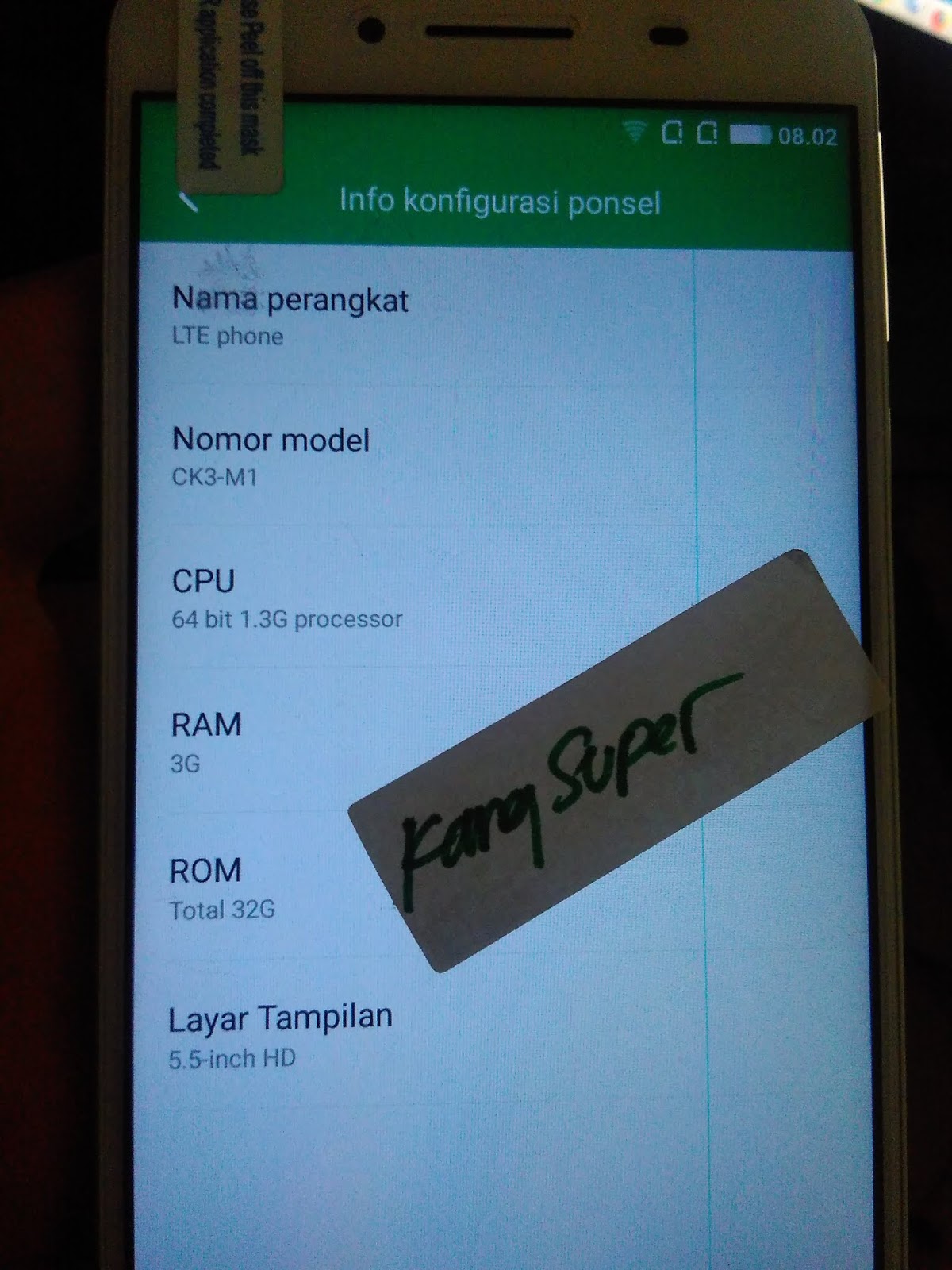
Bypass FRP & Flash IVVI CK3-M1 MT6735


FRP  IVVI CK3-M1 CK3-01 Verifikasi akun Google ini mencegah pengguna yang tidak sah dari Mengakses atau menggunakan perangkat Anda jika telah ulang ke pengaturan pabrik tanpa izin Anda (misalnya, jika perangkat hilang atau dicuri)


Brand     : ivvi
ProdName  : CK3-01
ProdModel : CK3-M1
Device    : CK3-01
AndroidVer: 5.1
MTKxCPU   : MT6735
MTKxPRJ   : ALPS.L1.MP3.V2.95_YL6735.65C.VO.L1_P139

pass:   ivi-okjoss


Bahan :
1. Download Firmware IVVI CK3-M1 MT6735


2. Download SP-Flash-Tool Wajib pake versi ini Download Disini
3. Driver bila belum punya instal dulu driver mtknya
4. Untuk tutorial flash via Flash tool bisa dilihat DISINI
5. Konfirmasi pass sms/wa only 0822-1163-1565 (nomor ini hanya buat konfirmasi, BUKAN YANG DI ISI) , Mahar pulsa 20k


Cara Flash IVVI CK3-M1 CK3-01 via Flash Tool

Log Read Flash IVVI CK3-M1 CK3-01
Operation : Read Flash [ v1.58 ]

1. Power Off Phone , Remove battery , Insert back
2. Insert USB cable. In some cases require hold BootKey

Wait for phone...
Phone found! [ 4 ]
Sync...
Inital Boot Ok!
BB_CPU_PID : 6735
BB_CPU_NME : [MediaTek] MT6735_S00
BB_CPU_EXT : 0xCA00 , 0x8A00 , 0x0000
Processing BROM stage
Settings for BROM configured!
SecCfgVal : 0x00000000
BromVer   : 0x00FF
BLVersion : 0x0001
PreLoader : Active [ Boot with PL ]
BootLdrSS : NORMAL with PRELOADER
Processing DA stage
DA Select done, will use MTK_AllInOne_DA_v5.1624.16.07
Sending and initialize DA ...
Running DA ver.4.2 on BBID : 0x93
NAND Flash : NOT INSTALLED
eMMC Flash : 520001154D42315808F107427F0A2BE0
Initialize Memory ...
DRAM already initialized by Preloader
DAgent sent , init HW now
eMMC FlashIC initialized
[eMMC] : FLASH_VEN : 0x15 , OEM : 0100
[eMMC] : FLASH_INF : [SAMSUNG] , BMB1X
[eMMC] : FLASH_CID : 150100525831424D4207F108E02B937F
[eMMC] : FLASH_BRT : 0x00400000 , 0x00400000 , 0x00400000
[eMMC] : FLASH_LEN : 0x0000000747C00000
[eMMC] : FLASH_UCP : 29820 MiB [eMMC 32 GiB]
DEV RID    : 0xFCC4CFBD1308FB18B5B54845423DCA1D
INT RAM    : 0x00020000
EXT RAM    : 0xC0000000 [3 GiB]
BOOT TYPE  : EMMC_FLASH_BOOT
SOC VERIFY : C1
Boot Ok!

Reading Flash Content now ...

xGPT : Normalize settings Ok!

Brand     : ivvi
ProdName  : CK3-01
ProdModel : CK3-M1
Device    : CK3-01
AndroidVer: 5.1
MTKxCPU   : MT6735
MTKxPRJ   : ALPS.L1.MP3.V2.95_YL6735.65C.VO.L1_P139

[Read Ok] : preloader_ck3_01.bin
[Read Ok] : lk.bin
[Read Ok] : boot.img
[Read Ok] : recovery.img
[Read Ok] : logo.bin
[Read Ok] : lk_bak.bin
[Read Ok] : secro.img
[Read Ok] : tz1.img
[Read Ok] : tz2.img
[Read Ok] : system.img
[Read Ok] : cache.img
[Read Ok] : userdata.img

[ScatCFG] : MT6735 / V1.1.2 / ck3_01 / EMMC
Android Info saved
MAUI Meta DB saved
HWConfig Info saved
FW Size : 3160 MiB
Scatter saved to : F:\New folder\MT6735__ivvi__CK3-M1__CK3-01__5.1__ALPS.L1.MP3.V2.95_YL6735.65C.VO.L1_P139\


Minggu, 11 Agustus 2019

Flash & Bypass FRP P20 Pro P10 ~ Huawei P20pro COPY MT6580 & MT6572

                                                GAMBAR DIATAS  MT6580

                                                GAMBAR DIATAS MT6572


FRP Wellcome P20pro  P10 Verifikasi akun Google ini mencegah pengguna yang tidak sah dari Mengakses atau menggunakan perangkat Anda jika telah ulang ke pengaturan pabrik tanpa izin Anda (misalnya, jika perangkat hilang atau dicuri)

pass :   well-p20joss


Bahan :
1. MT6580 
Brand     : WELCOME
ProdName  : P20 Pro
ProdModel : P10
Device    : P20Pro
AndroidVer: 8.1
MTKxCPU   : MT6580
MTKxPRJ   : ALPS.L1.MP6.V2_DROI6580.WEG.L
  • 1. Download Firmware Wellcome P20pro  P10 preloader_f9b1_tc_g4
  • 2. Download Firmware  Firmware Wellcome P20pro  P10 preloader aeon6580_weg_l_l100
 2. MT6572

Brand     : alps
ProdName  : x6_v5_x50
ProdModel : P20 pro
Device    : x6_v5_x50
AndroidVer: 4.4.2
MTKxCPU   : MT6572
MTKxPRJ   : Hongyue_W106_V43_3G_P20_pro
EMMC 4GB RAM 512


3. Download SP-Flash-Tool Wajib pake versi ini Download Disini
4. Driver bila belum punya instal dulu driver mtknya
5.  Untuk tutorial flash via Flash tool bisa dilihat DISINI
6. Konfirmasi pass sms/wa only 0822-1163-1565 (nomor ini hanya buat konfirmasi, BUKAN YANG DI ISI) , Mahar pulsa 20k

Cara Flash Wellcome P20pro  P10 via Flash Tool


Log Read Flash  Wellcome P20pro  P10 MT6580
Start  at : [8/10/2019 / 12:20:11 PM]
Operation : Read Flash [ v1.58 ]

1. Power Off Phone , Remove battery , Insert back
2. Insert USB cable. In some cases require hold BootKey

Wait for phone...
Phone found! [ 4 ]
Sync...
Inital Boot Ok!
BB_CPU_PID : 6580
BB_CPU_NME : [MediaTek] MT6580_S00
BB_CPU_EXT : 0xCA00 , 0x8A00 , 0x0000
Processing BROM stage
Settings for BROM configured!
SecCfgVal : 0x00000000
BromVer   : 0x00FF
BLVersion : 0x0001
PreLoader : Active [ Boot with PL ]
BootLdrSS : NORMAL with PRELOADER
Processing DA stage
DA Select done, will use MTK_AllInOne_DA_v5.1624.16.07
Sending and initialize DA ...
Running DA ver.4.2 on BBID : 0x94
NAND Flash : NOT INSTALLED
eMMC Flash : 1501004B3758564D42014BFAC2F57251
Initialize Memory ...
DRAM already initialized by Preloader
DAgent sent , init HW now
eMMC FlashIC initialized
[eMMC] : FLASH_VEN : 0x15 , OEM : 0100
[eMMC] : FLASH_INF : [SAMSUNG] , BMVX7
[eMMC] : FLASH_CID : 1501004B3758564D42014BFAC2F57251
[eMMC] : FLASH_BRT : 0x00400000 , 0x00400000 , 0x00080000
[eMMC] : FLASH_LEN : 0x00000001D2000000
[eMMC] : FLASH_UCP : 7456 MiB [eMMC 8 GiB]
DEV RID    : 0xFCC4CFBD0F067DBCE8A5FE03A02807EB
INT RAM    : 0x00020000
EXT RAM    : 0x40000000 [1 GiB]
BOOT TYPE  : EMMC_FLASH_BOOT
SOC VERIFY : C1
Boot Ok!

Reading Flash Content now ...

xGPT : Normalize settings Ok!

Brand     : WELCOME
ProdName  : P20 Pro
ProdModel : P10
Device    : P20Pro
AndroidVer: 8.1
MTKxCPU   : MT6580
MTKxPRJ   : ALPS.L1.MP6.V2_DROI6580.WEG.L

[Read Ok] : preloader_f9b1_tc_g4.bin
[Read Ok] : lk.bin
[Read Ok] : boot.img
[Read Ok] : recovery.img
[Read Ok] : logo.bin
[Read Ok] : secro.img
[Read Ok] : system.img
[Read Ok] : cache.img
[Read Ok] : userdata.img

[ScatCFG] : MT6580 / V1.1.2 / f9b1_tc_g4 / EMMC
Android Info saved
MAUI Meta DB saved
HWConfig Info saved
FW Size : 1518 MiB
Scatter saved to : F:\New folder (3)\New folder (2)\MT6580__WELCOME__P10__P20Pro__8.1__ALPS.L1.MP6.V2_DROI6580.WEG.L\

All done! 


Log Read Flash  P20pro MT6572
Operation : Read Flash [ v1.58 ]

1. Power Off Phone , Remove battery , Insert back
2. Insert USB cable. In some cases require hold BootKey

Wait for phone...
Phone found! [ 14 ]
Sync...
Inital Boot Ok!
BB_CPU_PID : 6572
BB_CPU_NME : [MediaTek] MT6572_S00
BB_CPU_EXT : 0xCA01 , 0x8A00 , 0x0000
Processing BROM stage
Settings for BROM configured!
SecCfgVal : 0x00000000
BromVer   : 0x00FF
BLVersion : 0x0001
PreLoader : Active [ Boot with PL ]
BootLdrSS : NORMAL with PRELOADER
Processing DA stage
DA Select done, will use MTK_AllInOne_DA_v5.1624.16.07
Sending and initialize DA ...
Running DA ver.4.2 on BBID : 0x88
NAND Flash : NOT INSTALLED
eMMC Flash : 70010053313030303408642A3B653243
Initialize Memory ...
DRAM already initialized by Preloader
DAgent sent , init HW now
eMMC FlashIC initialized
[eMMC] : FLASH_VEN : 0x70 , OEM : 0100
[eMMC] : FLASH_INF : [KINGSTON] , 40001
[eMMC] : FLASH_CID : 70010053313030303408642A3B653243
[eMMC] : FLASH_BRT : 0x00400000 , 0x00400000 , 0x00400000
[eMMC] : FLASH_LEN : 0x00000000E4000000
[eMMC] : FLASH_UCP : 3648 MiB [eMMC 4 GiB]
DEV RID    : 0xFCC4CFBDD77FF1D09094AB1C12BDD39B
INT RAM    : 0x00020000
EXT RAM    : 0x20000000 [512 MiB]
BOOT TYPE  : EMMC_FLASH_BOOT
SOC VERIFY : C1
Boot Ok!

Reading Flash Content now ...

Brand     : alps
ProdName  : x6_v5_x50
ProdModel : P20 pro
Device    : x6_v5_x50
AndroidVer: 4.4.2
MTKxCPU   : MT6572
MTKxPRJ   : Hongyue_W106_V43_3G_P20_pro