kangsuper
Tampilkan postingan dengan label FILE. Tampilkan semua postingan

Minggu, 05 Februari 2023

Firmware Samsung A04e A042F Scatter File


Product Brand: samsung
Product Device: a04e
Product Model: SM-A042F
Product Name: a04exx
SW : samsung/a04exx/a04e:12/SP1A.210812.016/A042FXXU1AVJ2:user/release-keys
Patch Level: SP1A.210812.016
Display ID: SP1A.210812.016.A042FXXU1AVJ2
SW Version: A042FXXU1AVJ2
Ver. CodeName: REL
Ver. Release: 12
Sec. Patch: 2022-10-01
Build Time: 10/6/2022 6:49:28 AM
Product Info: a04e
SW : a04exx-user 12 SP1A.210812.016 A042FXXU1AVJ2 release-keys
Product Manfct: samsung
Product Board: a04e
Board Platform: mt6765
Startegy: 3
Firmware ID: MT6765_samsung_SM-A042F_12_SP1A.210812.016.A042FXXU1AVJ2_SP1A.210812.016_a04e

 pass :

a0-42fjossboss

Bahan :
1. Download ROM Firmware Samsung A04e A042F Scatter File,

2. Tool pake Infinity CM2 atau Flasher sejenis, blm test pake flashtool

3. Driver bila belum punya instal dulu driver mtknya
4. Konfirmasi pass sms / wa only 0822-1163-1565 (nomor ini hanya buat konfirmasi, BUKAN YANG DI ISI) , Mahar SHOPEE PAY / GOPAY 20k


 Note :

CM2

-Uncek Forced Brom

-PORT : BOTH P & P

-CHECK LOCAL SLA


Operation: Identify Device [ v2.40a2 ]
Platform: MTK SmartPhone - MT65/67/68/81/83/87 | Helio G/P/X
Mode: FLASH
PORT: BOTH [ B + P ]
[+] Read Deep info: PRL, HW, DEBUG
[+] AutoEMI
[+] FireFly UNI-Proto
[+] Vendor-Specific Analyzer
[+] Local SLA
[-] Force BROM
Wait...

1. Power Off the device
2. Wait 20 seconds
3. Connect USB cable to device [remember Vol+ | Vol-]
Waiting for device connection...

PTFN: PreLoader USB VCOM Port (COM100)
MODE: PRELOADER PORT; PORT: 100
Waiting BOOT ack...
PRELOADER: ACK confirmed
BROM: Init BROM
BROM: Init passed
CHIP: MT6765 SBID: 0x8A00 HWVR: 0xCA00 SWVR: 0x0000 EVOL: 0x0000 HWC: 0x0766
CODE: Cervino
TYPE: MODERN  [RAPHAEL]
BROM: Sec Level: 0x00000005 Mode: SBC+SDA
BROM: BROM|BL : 0xFF|0x03 [PRELOADER PORT]
AGENT: 0_base: base_v2216 | Manual: Off
[3365c4d2] C:\InfinityBox\CM2MT231\boot\0_base\base_v2216\MTK_AllInOne_DA.bin
Looking for suitable BootChain in DA...
Found MT6765
AGENT: MTK_DOWNLOAD_AGENT
BROM: Sending 1st DA...
BROM: Reset Interface
PTFN: MTK USB Port (COM55)
MODE: BOOTROM; PORT: 55
Waiting BOOT ack...
BROM: Skip ACK verify
BROM: Init BROM
BROM: Init passed
CHIP: MT6765 SBID: 0x8A00 HWVR: 0xCA00 SWVR: 0x0000 EVOL: 0x0000 HWC: 0x0766
CODE: Cervino
TYPE: MODERN  [RAPHAEL]
MEID: 8857919ED5F11458F77662D7F77B3681
BROM: Sec Level: 0x000000E5 Mode: SBC+SDA+EXT
BROM: BROM|BL : 0x05|0xFE [BOOTROM]
BROM: SOCID: 7F4A7B5ABD1E2FE2BE37566A4D708B3D72A8D876E7FB4ACDC76D99BA6137D294
BROM: SLA: Local Auth
BROM: SLA: Starting Auth
BROM: FF: Look for EMI
BROM: FF: EMI found
BROM: SLA: Auth Passed
BROM: SEC: 0x000000E0
AGENT: 0_base: base_v2216 | Manual: Off
[3365c4d2] C:\InfinityBox\CM2MT231\boot\0_base\base_v2216\MTK_AllInOne_DA.bin
Looking for suitable BootChain in DA...
Found MT6765
AGENT: MTK_DOWNLOAD_AGENT
BROM: Sending 1st DA...
BROM: DA sent
BROM: Transfer control to DA...
DA: AGENT started
DA: SYNC
DA: MODE: BROM
DA: EXT_RAM NOT initialized

EMMC:
CID: 150100345836324D420038C6D03889ED
VEN: Samsung OEM: 0 ID: 345836324D42 [4X62MB] PRV: 0x00
SNN: 952553528 [0x38C6D038] MF: 8/2022

EMI: FireFly preloader_hs04.bin with 9 memory type(s) supported
EMI: Init EMI from INTERNAL DB
EMI: EXT_RAM CFG Passed

DA: BOOT to 2nd DA...
DA: 2ND stage confirmed
DA: SYNC with DA passed
DA: Receiving HW info

SRAM: 0x0003A000 [ 232.00 KB ]
DRAM: 0xC0000000 [ 3.00 GB ]

EMMC:
CID: 150100345836324D420038C6D03889ED
VEN: Samsung OEM: 0 ID: 345836324D42 [4X62MB] PRV: 0x00
SNN: 952553528 [0x38C6D038] MF: 8/2022
BOOT1: 0x00400000 [ 4.00 MB ]
BOOT2: 0x00400000 [ 4.00 MB ]
RPMB: 0x01000000 [ 16.00 MB ]
USER: 0x747C00000 [ 29.12 GB ]

CHIP: MT6765 SBID: 0x8A00 HWVR: 0xCA00 SWVR: 0x0000 EVOL: 0x0000 HWC: 0x0766
CODE: Cervino
TYPE: MODERN  [RAPHAEL]
RNID: C8B1A097B48FB87E6559C720447480B1
MEID: 8857919ED5F11458F77662D7F77B3681

DA: USB: HIGH-SPEED
Boot done [1]

Reading...
Ok
Product Brand: samsung
Product Device: a04e
Product Model: SM-A042F
Product Name: a04exx
SW : samsung/a04exx/a04e:12/SP1A.210812.016/A042FXXU1AVJ2:user/release-keys
Patch Level: SP1A.210812.016
Display ID: SP1A.210812.016.A042FXXU1AVJ2
SW Version: A042FXXU1AVJ2
Ver. CodeName: REL
Ver. Release: 12
Sec. Patch: 2022-10-01
Build Time: 10/6/2022 6:49:28 AM
Product Info: a04e
SW : a04exx-user 12 SP1A.210812.016 A042FXXU1AVJ2 release-keys
Product Manfct: samsung
Product Board: a04e
Board Platform: mt6765
Startegy: 3
Firmware ID: MT6765_samsung_SM-A042F_12_SP1A.210812.016.A042FXXU1AVJ2_SP1A.210812.016_a04e

Verify firmware [MT6765_samsung_SM-A042F_12_SP1A.210812.016.A042FXXU1AVJ2_SP1A.210812.016_a04e]...
Firmware is unknown
Please upload file https://infinity-box.com/?r=100020


NVRAM: TITAN_M04_S0MP1_K65V1_64_BSP_MDBIN_PCB01_MT6765_S00.MOLY_LR12A_R3_TC10_6M_A03S_GBL_PR_SP_V4_P7
NVRAM: Items: 0xBE Size: 0x0ACBD8 State: Ok
WiFi MAC: AA0036004400
BlTh MAC: DE2E468E0EC3
IMEI[1]: 6AFA585E8CBCF93
IMEI[2]: BB3B994F42CBE1C

Verify device config...
Ok
Loaders Ok

Backup [20] to C:\InfinityBox\CM2MT231\backup\MT6765__8857919ED5F11458F77662D7F77B3681\
[5] Read: NVRAM
[26] Read: NVDATA
[32] Read: PROINFO
[12] Read: LK
[25] Read: NVCFG
[16] Read: PROTECT1
[1] Read: PGPT
[37] Read: PERSIST
[0] Read: PRELOADER
[2] Read: EFS
[3] Read: SEC_EFS
[31] Read: PERSISTENT
Done 12 files
Compress: C:\InfinityBox\CM2MT231\backup\MT6765__8857919ED5F11458F77662D7F77B3681\
Cleanup...
Ok
Verify C:\InfinityBox\CM2MT231\backup\MT6765__8857919ED5F11458F77662D7F77B3681.7z
Exist [8857919ED5F11458F77662D7F77B3681]

STORAGE : Life Status : eMMC : OK!
STORAGE : OTP Status : NOT Enabled!
STORAGE : RPMB Status : eMMC : RPMB  KEY PROGRAMMED [UNUSABLE]
 
Scan preloader...
Preloader:
EMI: MT6765 preloader_hs04.bin with 9 memory type(s) supported
[00] eMMC LP_DDR4X ID: 150100445836384D42   Ven: Samsung   | Dev: DX68MB RAM: [ 3.00 GB ]
[01] eMMC LP_DDR4X ID: 150100445036444142   Ven: Samsung   | Dev: DP6DAB RAM: [ 4.00 GB ]
[02] eMMC LP_DDR4X ID: 150100444336444D42   Ven: Samsung   | Dev: DC6DMB RAM: [ 4.00 GB ]
[03] eMMC LP_DDR4X ID: 150100345836324D42   Ven: Samsung   | Dev: 4X62MB RAM: [ 3.00 GB ]
[04] eMMC LP_DDR4X ID: 150100445036444242   Ven: Samsung   | Dev: DP6DBB RAM: [ 4.00 GB ]
[05] eMMC LP_DDR4X ID: 13014E473243323139   Ven: Micron    | Dev: G2C219 RAM: [ 4.00 GB ]
[06] eMMC LP_DDR4X ID: 150100445636444242   Ven: Samsung   | Dev: DV6DBB RAM: [ 4.00 GB ]
[07] eMMC LP_DDR4X ID: 150100445036384D42   Ven: Samsung   | Dev: DP68MB RAM: [ 3.00 GB ]
[08] eMMC LP_DDR4X ID: 13014E473243323133   Ven: Micron    | Dev: G2C213 RAM: [ 4.00 GB ]
Preloader saved: C:\InfinityBox\CM2MT231\backup\preloader\preloader_hs04.bin
Verify C:\InfinityBox\CM2MT231\backup\preloader\preloader_hs04.bin [f7f17857]...
Exist
Done: 00:01:17


Selasa, 01 Februari 2022

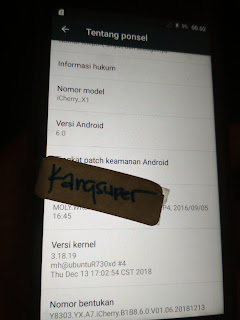
Firmware Vava iCherry X1 MT6580


Patch Level    : MRA58K
Display ID     : Y8303.YX.A7.iCherry.B1B8.6.0.V01.06.20181213
Ver. CodeName  : REL
Ver. Release   : 6.0
Sec. Patch     : 2016-08-05
Build Time     : 13.12.2018
Product Model  : iCherry_X1
Product Brand  : VAVA
Product Name   : iCherry_X1
Product Device : iCherry_X1
Product Manfct : VAVA
Board Platform : mt6580
Product Info   : iCherry_X1

MT6580__VAVA__iCherry_X1__6.0__Y8303.YX.A7.iCherry.B1B8.6.0.V01.06.20181213__MRA58K__iCherry_X1

 Bahan :
1. Download ROM Firmware Vava iCherry X1 | MT6580  Scatter File

2. Download SP-Flash-Tool Download Disini
3. Driver bila belum punya instal dulu driver mtknya
4. Untuk tutorial flash via Flash tool bisa dilihat DISINI
5. Konfirmasi pass sms / wa only 0822-1163-1565 (nomor ini hanya buat konfirmasi, BUKAN YANG DI ISI) , Mahar SHOPEE PAY / GOPAY 20k


Operation : Read Firmware Vava iCherry X1[ v2.29 ]

ExtSparse   : Enabled
ForceRead   : Disabled

1. Make sure device is powered off. Power off, if need. Wait 20 seconds after
2. Insert USB cable in phone
Waiting for device connection ...

PTFN : PreLoader USB VCOM Port (COM26)
MODE : PRELOADER PORT
PORT : 26
Waiting BOOT ack ...
PRELOADER : ACK confirmed!
BROM : Init BROM
BROM init passed!
     CHIP : MT6580 , SBID : 0x8A00 , HWVR : 0xCA00 , SWVR : 0x0000
     TYPE : LEGACY [MTK]
BROM : SecLevel : 0x00000000
BROM : SecMode  : PLAIN
BROM : BROM|BL  : 0xFF|0x01
BROM : PRELOADER PORT
AGENT : 0_base : BASE_v2112 | Manual : Disabled
AGENT : Look for suitable BootChain in DA ...
AGENT : MTK_AllInOne_DA.bin
AGENT : Found MT6580
AGENT : MTK_DOWNLOAD_AGENT
     BROM : Sending 1st DA ...
BROM : DA sent
BROM :Transfer control to DA ...
     DA : AGENT started!
NAND : DEVICE NOT FOUND
NAND : 000000000000000000000000
eMMC : OK
eMMC : 5100011542363133F6F20142B7C3D8B2
DAInf: 4 : 2 : 156
     DA : DRAM ready!
DA : BOOT to 2nd DA ...
DA : Receiving HW info

        EMMC: CID : 15010051333136424201F2F6B2D8C3B7
        EMMC: VEN : SAMSUNG : OEM : 0 : ID : 513331364242
        EMMC: VEN : SAMSUNG : Q316BB
        EMMC: SNN : 4076253912 ( 0xF2F6B2D8) , MF : 12/2016

        EMMC:
              BOOT1  : 0x00400000 [ 4.00 MB ]
              BOOT2  : 0x00400000 [ 4.00 MB ]
              RPMB   : 0x00400000 [ 4.00 MB ]
              USER   : 0x3A3E00000 [ 14.56 GB ]

        SRAM: 0x00020000 [ 128.00 KB ]
        DRAM: 0x40000000 [ 1.00 GB ]

        CHIP : MT6580 , SBID : 0x8A00 , HWVR : 0xCA00 , SWVR : 0x0000 , EVOL : 0x0000

        RNID : BFF77AAA8AA2F2032AD52D1DAC86EE1E

 STATUS : BLANK FLASH
 BSTYLE : EMMC FLASH BOOT

DA : USB : HIGH-SPEED

Boot done!

Patch Level    : MRA58K
Display ID     : Y8303.YX.A7.iCherry.B1B8.6.0.V01.06.20181213
Ver. CodeName  : REL
Ver. Release   : 6.0
Sec. Patch     : 2016-08-05
Build Time     : 13.12.2018
Product Model  : iCherry_X1
Product Brand  : VAVA
Product Name   : iCherry_X1
Product Device : iCherry_X1
Product Manfct : VAVA
Board Platform : mt6580
Product Info   : iCherry_X1

MT6580__VAVA__iCherry_X1__6.0__Y8303.YX.A7.iCherry.B1B8.6.0.V01.06.20181213__MRA58K__iCherry_X1

Read : preloader.bin
Read : proinfo.img
Read : nvram.bin
Read : lk.bin
Read : boot.img
Read : recovery.img
Read : logo.bin
Read : secro.img
Read : system.img
ExtSparse : Compression ratio : 43%
Read : cache.img
Read : userdata.img

FW Size  : 1.48 GB
Android Info saved : _Android_info.txt
Scatter  : MT6580_Android_scatter.txt
Saved to : D:\New folder (2)\New folder\MT6580__VAVA__iCherry_X1__6.0__Y8303.YX.A7.iCherry.B1B8.6.0.V01.06.20181213__MRA58K__iCherry_X1\

Done!
Elapsed: 00:11:09


Jumat, 21 Januari 2022

Firmware MAIMETE M3 PRO MT6572 | MT6572__alps__m3_pro__x6_v5_x50__4.4.2__X3-m3_pro-CPT


Brand     : alps
ProdName  : x6_v5_x50
ProdModel : m3 pro
Device    : x6_v5_x50
AndroidVer: 4.4.2
MTKxCPU   : MT6572
MTKxPRJ   : X3-m3_pro-CPT

Bahan :
1. Download ROM Firmware MAIMETE M3 PRO Scatter File

2. Download SP-Flash-Tool Download Disini
3. Driver bila belum punya instal dulu driver mtknya
4. Untuk tutorial flash via Flash tool bisa dilihat DISINI
5. Konfirmasi pass sms / wa only 0822-1163-1565 (nomor ini hanya buat konfirmasi, BUKAN YANG DI ISI) , Mahar SHOPEE PAY / GOPAY 20k


 Operation : Read Flash [ v1.58 ]

1. Power Off Phone , Remove battery , Insert back
2. Insert USB cable. In some cases require hold BootKey

Wait for phone...
Phone found! [ 26 ]
Sync...
Inital Boot Ok!
BB_CPU_PID : 6572
BB_CPU_NME : [MediaTek] MT6572_S00
BB_CPU_EXT : 0xCA01 , 0x8A00 , 0x0000
Processing BROM stage
Settings for BROM configured!
SecCfgVal : 0x00000000
BromVer   : 0x00FF
BLVersion : 0x0001
PreLoader : Active [ Boot with PL ]
BootLdrSS : NORMAL with PRELOADER
Processing DA stage
DA Select done, will use MTK_AllInOne_DA_v5.1624.16.07
Sending and initialize DA ...
Running DA ver.4.2 on BBID : 0x88
NAND Flash : NOT INSTALLED
eMMC Flash : 150100534A5330304D00CC3003312131
Initialize Memory ...
DRAM already initialized by Preloader
DAgent sent , init HW now
eMMC FlashIC initialized
[eMMC] : FLASH_VEN : 0x15 , OEM : 0100
[eMMC] : FLASH_INF : [SAMSUNG] , M00SJ
[eMMC] : FLASH_CID : 150100534A5330304D00CC3003312131
[eMMC] : FLASH_BRT : 0x00100000 , 0x00100000 , 0x00020000
[eMMC] : FLASH_LEN : 0x00000000E9000000
[eMMC] : FLASH_UCP : 3728 MiB [eMMC 4 GiB]
DEV RID    : 0xA931556796244718974A3739CD05F239
INT RAM    : 0x00020000
EXT RAM    : 0x20000000 [512 MiB]
BOOT TYPE  : EMMC_FLASH_BOOT
SOC VERIFY : C1
Boot Ok!

Reading Flash Content now ...

Brand     : alps
ProdName  : x6_v5_x50
ProdModel : m3 pro
Device    : x6_v5_x50
AndroidVer: 4.4.2
MTKxCPU   : MT6572
MTKxPRJ   : X3-m3_pro-CPT

[Read Ok] : preloader_x6_v5_x50.bin
[Read Ok] : MBR
[Read Ok] : EBR1
[Read Ok] : lk.bin
[Read Ok] : boot.img
[Read Ok] : recovery.img
[Read Ok] : secro.img
[Read Ok] : logo.bin
[Read Ok] : system.img
[Read Ok] : cache.img
[Read Ok] : userdata.img

[ScatCFG] : MT6572 / V1.1.1 / x6_v5_x50 / EMMC
Android Info saved
MAUI Meta DB saved
HWConfig Info savedg
FW Size : 678 MiB
Scatter saved to : D:\New folder\MT6572__alps__m3_pro__x6_v5_x50__4.4.2__X3-m3_pro-CPT\

All done!


Rabu, 10 November 2021

Firmware ZYREX ZT-216 SPD | SP9832A_2H11_VOLTE_ZT_216_7.0_MT-704QF_USER_V1_20180320_ZT_216


 NO SS

File Info
Created by Infinity-Box (c) Chinese Miracle II (c) 2017
Device Brand   : zyrex
Device Model   : ZT_216
Device CPU     : sp9832a_2h11_volte
Device IntName : ZT_216
Device Version : 7.0
Device Compile : 3/20/2018 12:30:17 PM
Device Project : MT-704QF_USER_V1_20180320
Device ExtInfo : ZT 216


Bahan :

Tool  :

  1. Download SPD_Upgrade_Tool_R4.0.0001 Download Disini
  2. Tutorial Flash via research here
  3. Driver SPD by InfinityBox
  4. Konfirmasi pass sms only 0822-1163-1565 (nomor ini hanya buat konfirmasi, BUKAN YANG DI ISI) , Mahar SHOPEE PAY / GOPAY 20k


Cara Kerja :

  • BOOT VOLUME -/DOWN

 
 Operation : Read FullFlash [ v1.27 ]

1. Remove battery. Insert battery back
2. Press and hold 'VolumeUp' and 'VolumeDown' keys
 -> Alternative : just ONE 'VolumeUp' or 'VolumeDown' key
3. Insert cable

 ====  Wait for phone...

Phone found! [ 8 ]
Port Opened
Sync...
InitBoot Done [ 0x81 ] , Ver : SPRD3
Sync...
Sending FDL
[Info] : If SW freeze here more, than 15 seconds - remove cable
FDL Ready!
Boot Ver : SC983x eMMC Loader v5.0 Infinity
Sending FLASH FDL
FLASH FDL Ready!
Boot Ok!

FlashMode Set : Ok!
Detected eMMC Flash , Structure detect Ok!

[FW_READER] : Prepare Ok!
- > Wait phone connected ...

Phone found! [ 8 ]
Port Opened
Sync...
InitBoot Done [ 0x81 ] , Ver : SPRD3
Sync...
Sending FDL
[Info] : If SW freeze here more, than 15 seconds - remove cable
FDL Ready!
Boot Ver : SC983x eMMC Loader v5.0 Infinity
Sending FLASH FDL
FLASH FDL Ready!
Boot Ok!

- > Wait phone connected ...

Phone found! [ 8 ]
Port Opened
Sync...
InitBoot Done [ 0x81 ] , Ver : SPRD3
Sync...
Sending FDL
[Info] : If SW freeze here more, than 15 seconds - remove cable
FDL Ready!
Boot Ver : SC983x eMMC Loader v5.0 Infinity
Sending FLASH FDL
FLASH FDL Ready!
Boot Ok!

Model Name  : ZT_216
Model Brand : zyrex
Model Device: ZT_216
AndrVersion : 7.0
BaseBand CPU: SP9832A_2H11_VOLTE
Project Ver : MT-704QF_USER_V1_20180320
Model Ext   : ZT 216

[Read Mode] : HSUSB : 0x3000

[FW_READER] : Reading Firmware Now ...

[Read Ok] : u-boot-spl-16k.bin
[Read Ok] : u-boot.bin
[Read Ok] : prodnv.img
[Read Ok] : nvitem_l.bin
[Read Ok] : sc983x_cp1.bin
[Read Ok] : DSP_DM_Gx.bin
[Read Ok] : DSP_DM_Gx.bin
[Read Ok] : l__WPH_arm7.bin
[Read Ok] : PM_arm7_sys.bin
[Read Ok] : logo_1024x600.bin
[Read Ok] : fblogo_1024x600.bin
[Read Ok] : wcn_fdl.bin
[Read Ok] : AA_MARLIN.bin
[Read Ok] : boot.img
[Read Ok] : trustos.bin
[Read Ok] : vmm.bin
[Read Ok] : system.img
[Read Ok] : sysinfo.img
[Build Ok] : cache.img
[Read Ok] : recovery.img
[Build Ok] : userdata.img

AndroidInfo created
Firmware Size : 2706 MiB
Saved to : E:\zyrex\zt 216\SP9832A_2H11_VOLTE_ZT_216_7.0_MT-704QF_USER_V1_20180320_ZT_216\
Done!


Senin, 05 Juli 2021

Firmware Maimete M10 PLUS


Brand     : alps
ProdName  : x6_v5_x50
ProdModel : m10 Plus
Device    : x6_v5_x50
AndroidVer: 4.4.2
MTKxCPU   : MT6572
MTKxPRJ   : HY_W116_Q906A-m10_Plus-QB

Bahan :
1. Download ROM Firmware Maimete M10 PLUS  Scatter File

2. Download SP-Flash-Tool Download Disini
3. Driver bila belum punya instal dulu driver mtknya
4. Untuk tutorial flash via Flash tool bisa dilihat DISINI
5. Konfirmasi pass sms / wa only 0822-1163-1565 (nomor ini hanya buat konfirmasi, BUKAN YANG DI ISI) , Mahar SHOPEE PAY / GOPAY 20k

  NOTE :

1. BACKUP

2. COBA FLASH SYSTEM,USERDATA,CACHE DULU SAJA

KLO GAK BISA BARU FLASH FULL


Log read firmware Maimeite M10 PLUS

Operation : Read Flash [ v1.58 ]

1. Power Off Phone , Remove battery , Insert back
2. Insert USB cable. In some cases require hold BootKey

Wait for phone...
Phone found! [ 4 ]
Sync...
Inital Boot Ok!
BB_CPU_PID : 6572
BB_CPU_NME : [MediaTek] MT6572_S00
BB_CPU_EXT : 0xCA01 , 0x8A00 , 0x0000
Processing BROM stage
Settings for BROM configured!
SecCfgVal : 0x00000000
BromVer   : 0x00FF
BLVersion : 0x0001
PreLoader : Active [ Boot with PL ]
BootLdrSS : NORMAL with PRELOADER
Processing DA stage
DA Select done, will use MTK_AllInOne_DA_v5.1624.16.07
Sending and initialize DA ...
Running DA ver.4.2 on BBID : 0x88
NAND Flash : NOT INSTALLED
eMMC Flash : 90014A2058494E594816A17920D0603F
Initialize Memory ...
DRAM already initialized by Preloader
DAgent sent , init HW now
eMMC FlashIC initialized
[eMMC] : FLASH_VEN : 0x90 , OEM : 014A
[eMMC] : FLASH_INF : [HYNIX] , HYNIX
[eMMC] : FLASH_CID : 90014A2058494E594816A17920D0603F
[eMMC] : FLASH_BRT : 0x00200000 , 0x00200000 , 0x00200000
[eMMC] : FLASH_LEN : 0x00000000E7000000
[eMMC] : FLASH_UCP : 3696 MiB [eMMC 4 GiB]
DEV RID    : 0xA9315567BEDEE1850A62DABAABC610F3
INT RAM    : 0x00020000
EXT RAM    : 0x20000000 [512 MiB]
BOOT TYPE  : EMMC_FLASH_BOOT
SOC VERIFY : C1
Boot Ok!

Reading Flash Content now ...

Brand     : alps
ProdName  : x6_v5_x50
ProdModel : m10 Plus
Device    : x6_v5_x50
AndroidVer: 4.4.2
MTKxCPU   : MT6572
MTKxPRJ   : HY_W116_Q906A-m10_Plus-QB

[Read Ok] : preloader_x6_v5_x50.bin
[Read Ok] : MBR
[Read Ok] : EBR1
[Read Ok] : lk.bin
[Read Ok] : boot.img
[Read Ok] : recovery.img
[Read Ok] : secro.img
[Read Ok] : logo.bin
[Read Ok] : system.img
[Read Ok] : cache.img
[Read Ok] : userdata.img

[ScatCFG] : MT6572 / V1.1.1 / x6_v5_x50 / EMMC
Android Info saved
MAUI Meta DB saved
HWConfig Info saved
FW Size : 678 MiB
Scatter saved to : D:\ANDROID LAIN2\MAIMEITE\maimete m10 plus\MT6572__alps__m10_Plus__x6_v5_x50__4.4.2__HY_W116_Q906A-m10_Plus-QB\

All done! 


Selasa, 25 Mei 2021

Samsung S20+ COPY/CLONE | MT6582


platform: MT6582, cpu abi: armeabi-v7a
manufacturer: S20+
board: , name: full_q15_tx_g65_s20_emmc64_8_ddr2_b15
brand: S20+, model: S6
build id: LRX21M, version: 5.0.2 Lollipop (DW_Q15_64V8_B15_FWP_TX_G65_S20+_V1.0_20201202)
build description: full_q15_tx_g65_s20_emmc64_8_ddr2_b15-user 5.0.2 LRX21M 1606912200 release-keys
build version: DW_Q15_64V8_B15_FWP_TX_G65_S20+_V1.0
lcd: gc9503v_fwvgaj_jiaj_h10_ivo  st7701s_fwvgaj_dw_x01_boe  jd9161aa_fwvgajj_tx_g65_1014boe  jd9161aa_fwvgaj_tx_g66_ivo
screen resolution: 1014 x 480
 lens: dw9714af fm50af
audio: amp_aw8736
touch: focaltech_new  gslX680
modem: dw_q15_b15

preloader_q15_tx_g65_s20_emmc64_8_ddr2_b15.bin

Bahan :
1. Download ROM Firmware Wearnes ZeusPhone ZP-452  Scatter File

2. Download SP-Flash-Tool Download Disini
3. Driver bila belum punya instal dulu driver mtknya
4. Untuk tutorial flash via Flash tool bisa dilihat DISINI
5. Konfirmasi pass sms / wa only 0822-1163-1565 (nomor ini hanya buat konfirmasi, BUKAN YANG DI ISI) , Mahar SHOPEE PAY / GOPAY 20k


Log read firmware Samsung S20+ COPY/CLONE | MT6582

Please "Identify Device" at first, before any other operation.
name: MTK_PLATFORM_CFG
 version: V1.1.1
 platform: MT6582
 project: q15_tx_g65_s20_emmc64_8_ddr2_b15
 storage: EMMC
 bootChannel: MSDC_0
 blockSize: 0x00020000
MTK Preloader file info.
Found 9 supported eMMC CID:
 [Samsung] K7XVMB     1501004B 3758564D 42xxxxxx xxxxxxxx
 [Samsung] K7U00M     1501004B 37553030 4Dxxxxxx xxxxxxxx
 [SanDisk] SEM08G     45010053 454D3038 47xxxxxx xxxxxxxx
 [Micron] P1J95L     FE014E50 314A3935 4Cxxxxxx xxxxxxxx
 [Kingston] V10008     70010056 31303030 38xxxxxx xxxxxxxx
 [SK Hynix] H8G1e     90014A48 38473165 05xxxxxx xxxxxxxx
 [SK Hynix] H8G2d     90014A48 38473264 04xxxxxx xxxxxxxx
 [Toshiba] 008G92     11010030 30384739 32xxxxxx xxxxxxxx
 [Micron] P1J95K     FE014E50 314A3935 4Bxxxxxx xxxxxxxx
BROM version[0]: 7.1621.1.0
Loading DA: MTK_AllInOne_DA.bin (5.42 MiB)
 version: 3.3001.00.00, start addr: 0x40000800
Connecting to BootROM...
 Power off the phone, disconnect and reconnect the battery(if possible) and connect USB cable...
 Hold the VOL DOWN to force MediaTek BootROM.
 Scanning BootROM or Preloader port(30 s)... Done.
 Detected PreLoader USB VCOM Port (COM4)
 Connection status: EHCI:HUB:HUB:USB 2.0 High-Speed
 USB Driver: [MediaTek Inc.] usbser, version: 2.0.0.0, date: 12-24-2011
Connecting Bootrom... Done.
Sending Download Agent... Done.
Platform: MT6582_S01, Hw ver: 0xCA01, Sw ver: 0x0001
 Secure ver: 0xFF, BL ver: 0x01
 Secure config: 0x00
 SRAM size: 128 KiB
DRAM size: 1 GiB
Storage type: eMMC
Card/BGA: BGA (Discrete embedded)
Manufacturer ID: 0x70 (Kingston)
Product name: V10008 (0x563130303038), rev: 0x06, serial number: 0xA81F3858
Manufacturing date: Sep 2015
CID: 70010056 31303030 3806A81F 3858924F
Capacity: 7.06 GiB(7,579,107,328 bytes)
 Boot1: 4096 KiB
 Boot2: 4096 KiB
 RPMB: 4096 KiB
 User area: 7.05 GiB(7,566,524,416 bytes)
USB speed: High-Speed
platform: MT6582, cpu abi: armeabi-v7a
manufacturer: S20+
board: , name: full_q15_tx_g65_s20_emmc64_8_ddr2_b15
brand: S20+, model: S6
build id: LRX21M, version: 5.0.2 Lollipop (DW_Q15_64V8_B15_FWP_TX_G65_S20+_V1.0_20201202)
build description: full_q15_tx_g65_s20_emmc64_8_ddr2_b15-user 5.0.2 LRX21M 1606912200 release-keys
build version: DW_Q15_64V8_B15_FWP_TX_G65_S20+_V1.0
lcd: gc9503v_fwvgaj_jiaj_h10_ivo  st7701s_fwvgaj_dw_x01_boe  jd9161aa_fwvgajj_tx_g65_1014boe  jd9161aa_fwvgaj_tx_g66_ivo
screen resolution: 1014 x 480
 lens: dw9714af fm50af
audio: amp_aw8736
touch: focaltech_new  gslX680
modem: dw_q15_b15
BROM version[0]: 7.1621.1.0
Loading DA: MTK_AllInOne_DA.bin (5.42 MiB)
 version: 3.3001.00.00, start addr: 0x40000800
Connecting to BootROM...
 Power off the phone, disconnect and reconnect the battery(if possible) and connect USB cable...
 Hold the VOL DOWN to force MediaTek BootROM.
 Scanning BootROM or Preloader port(30 s)... Done.
 Detected PreLoader USB VCOM Port (COM4)
 Connection status: EHCI:HUB:HUB:USB 2.0 High-Speed
 USB Driver: [MediaTek Inc.] usbser, version: 2.0.0.0, date: 12-24-2011
Connecting Bootrom... Done.
Sending Download Agent... Done.
Platform: MT6582_S01, Hw ver: 0xCA01, Sw ver: 0x0001
 Secure ver: 0xFF, BL ver: 0x01
 Secure config: 0x00
 SRAM size: 128 KiB
DRAM size: 1 GiB
PL Secure ver: 0x02
Storage type: eMMC
Card/BGA: BGA (Discrete embedded)
Manufacturer ID: 0x70 (Kingston)
Product name: V10008 (0x563130303038), rev: 0x06, serial number: 0xA81F3858
Manufacturing date: Sep 2015
CID: 70010056 31303030 3806A81F 3858924F
Capacity: 7.06 GiB(7,579,107,328 bytes)
 Boot1: 4096 KiB
 Boot2: 4096 KiB
 RPMB: 4096 KiB
 User area: 7.05 GiB(7,566,524,416 bytes)
USB speed: High-Speed
platform: MT6582, cpu abi: armeabi-v7a
manufacturer: S20+
board: , name: full_q15_tx_g65_s20_emmc64_8_ddr2_b15
brand: S20+, model: S6
build id: LRX21M, version: 5.0.2 Lollipop (DW_Q15_64V8_B15_FWP_TX_G65_S20+_V1.0_20201202)
build description: full_q15_tx_g65_s20_emmc64_8_ddr2_b15-user 5.0.2 LRX21M 1606912200 release-keys
build version: DW_Q15_64V8_B15_FWP_TX_G65_S20+_V1.0
lcd: gc9503v_fwvgaj_jiaj_h10_ivo  st7701s_fwvgaj_dw_x01_boe  jd9161aa_fwvgajj_tx_g65_1014boe  jd9161aa_fwvgaj_tx_g66_ivo
screen resolution: 1014 x 480
 lens: dw9714af fm50af
audio: amp_aw8736
touch: focaltech_new  gslX680
modem: dw_q15_b15
BROM version[0]: 7.1621.1.0
Loading DA: MTK_AllInOne_DA.bin (5.42 MiB)
 version: 3.3001.00.00, start addr: 0x40000800
Connecting to BootROM...
 Power off the phone, disconnect and reconnect the battery(if possible) and connect USB cable...
 Hold the VOL DOWN to force MediaTek BootROM.
 Scanning BootROM or Preloader port(30 s)... Done.
 Detected PreLoader USB VCOM Port (COM4)
 Connection status: EHCI:HUB:HUB:USB 2.0 High-Speed
 USB Driver: [MediaTek Inc.] usbser, version: 2.0.0.0, date: 12-24-2011
Connecting Bootrom... Done.
Sending Download Agent... Done.
Platform: MT6582_S01, Hw ver: 0xCA01, Sw ver: 0x0001
 Secure ver: 0xFF, BL ver: 0x01
 Secure config: 0x00
 SRAM size: 128 KiB
DRAM size: 1 GiB
PL Secure ver: 0x02
Storage type: eMMC
Card/BGA: BGA (Discrete embedded)
Manufacturer ID: 0x70 (Kingston)
Product name: V10008 (0x563130303038), rev: 0x06, serial number: 0xA81F3858
Manufacturing date: Sep 2015
CID: 70010056 31303030 3806A81F 3858924F
Capacity: 7.06 GiB(7,579,107,328 bytes)
 Boot1: 4096 KiB
 Boot2: 4096 KiB
 RPMB: 4096 KiB
 User area: 7.05 GiB(7,566,524,416 bytes)
USB speed: High-Speed
platform: MT6582, cpu abi: armeabi-v7a
manufacturer: S20+
board: , name: full_q15_tx_g65_s20_emmc64_8_ddr2_b15
brand: S20+, model: S6
build id: LRX21M, version: 5.0.2 Lollipop (DW_Q15_64V8_B15_FWP_TX_G65_S20+_V1.0_20201202)
build description: full_q15_tx_g65_s20_emmc64_8_ddr2_b15-user 5.0.2 LRX21M 1606912200 release-keys
build version: DW_Q15_64V8_B15_FWP_TX_G65_S20+_V1.0
lcd: gc9503v_fwvgaj_jiaj_h10_ivo  st7701s_fwvgaj_dw_x01_boe  jd9161aa_fwvgajj_tx_g65_1014boe  jd9161aa_fwvgaj_tx_g66_ivo
screen resolution: 1014 x 480
 lens: dw9714af fm50af
audio: amp_aw8736
touch: focaltech_new  gslX680
modem: dw_q15_b15
Reading preloader_q15_tx_g65_s20_emmc64_8_ddr2_b15.bin... Done.
Reading mbr... Done.
Reading ebr1... Done.
Reading pro_info... Done.
Reading nvram... Done.
Reading protect_f... Done.
Reading protect_s... Done.
Reading seccfg... Done.
Reading uboot.bin... Done.
Reading bootimg.img... Done.
Reading recovery.img... Done.
Reading sec_ro.img... Done.
Reading misc... Done.
Reading logo.bin... Done.
Reading expdb... Done.
Reading android.img... Done.
Reading cache.img... Done.
Reading usrdata.img... Done.
Files saved to \\D:\ANDROID%20LAIN2\samsung\s20+\MT6582__S20+__S6__q15_tx_g65_s20_emmc64_8_ddr2_b15__5.0.2__DW_Q15_64V8_B15_FWP_TX_G65_S20+_V1.0\DW_Q15_64V8_B15_FWP_TX_G65_S20+_V1.0_20201202\
Completed in 23 mins 18.758 s


Selasa, 11 Mei 2021

Flash & Firmware Maimeite NOTE30 PLUS | NOTE 30 +


Brand     : alps
ProdName  : x6_v5_x50
ProdModel : Note30 Plus
Device    : x6_v5_x50
AndroidVer: 4.4.2
MTKxCPU   : MT6572
MTKxPRJ   : HY_W106_M501-Note30_Plus
 pass : not-e30+sip

Bahan :
1. Download ROM Firmware Firmware Maimeite NOTE30 PLUS   Scatter File

2. Download SP-Flash-Tool Download Disini
3. Driver bila belum punya instal dulu driver mtknya
4. Untuk tutorial flash via Flash tool bisa dilihat DISINI
5. Konfirmasi pass sms / wa only 0822-1163-1565 (nomor ini hanya buat konfirmasi, BUKAN YANG DI ISI) , Mahar SHOPEE PAY / GOPAY 20k

 NOTE :

1. BACKUP

2. COBA FLASH SYSTEM,USERDATA,CACHE DULU SAJA

KLO GAK BISA BARU FLASH FULL


Log read firmware Maimeite NOTE30 PLUS

Operation : Read Flash [ v1.58 ]

1. Power Off Phone , Remove battery , Insert back
2. Insert USB cable. In some cases require hold BootKey

Wait for phone...
Phone found! [ 4 ]
Sync...
Inital Boot Ok!
BB_CPU_PID : 6572
BB_CPU_NME : [MediaTek] MT6572_S00
BB_CPU_EXT : 0xCA01 , 0x8A00 , 0x0000
Processing BROM stage
Settings for BROM configured!
SecCfgVal : 0x00000000
BromVer   : 0x00FF
BLVersion : 0x0001
PreLoader : Active [ Boot with PL ]
BootLdrSS : NORMAL with PRELOADER
Processing DA stage
DA Select done, will use MTK_AllInOne_DA_v5.1624.16.07
Sending and initialize DA ...
Running DA ver.4.2 on BBID : 0x88
NAND Flash : NOT INSTALLED
eMMC Flash : 1501004E35585A4D42036AD8D0CC31BF
Initialize Memory ...
DRAM already initialized by Preloader
DAgent sent , init HW now
eMMC FlashIC initialized
[eMMC] : FLASH_VEN : 0x15 , OEM : 0100
[eMMC] : FLASH_INF : [SAMSUNG] , BMZX5
[eMMC] : FLASH_CID : 1501004E35585A4D42036AD8D0CC31BF
[eMMC] : FLASH_BRT : 0x00400000 , 0x00400000 , 0x00080000
[eMMC] : FLASH_LEN : 0x00000000E9000000
[eMMC] : FLASH_UCP : 3728 MiB [eMMC 4 GiB]
DEV RID    : 0xFCC4CFBDA33A00652756689ED5478A53
INT RAM    : 0x00020000
EXT RAM    : 0x20000000 [512 MiB]
BOOT TYPE  : EMMC_FLASH_BOOT
SOC VERIFY : C1
Boot Ok!

Reading Flash Content now ...

Brand     : alps
ProdName  : x6_v5_x50
ProdModel : Note30 Plus
Device    : x6_v5_x50
AndroidVer: 4.4.2
MTKxCPU   : MT6572
MTKxPRJ   : HY_W106_M501-Note30_Plus

[Read Ok] : preloader_x6_v5_x50.bin
[Read Ok] : MBR
[Read Ok] : EBR1
[Read Ok] : lk.bin
[Read Ok] : boot.img
[Read Ok] : recovery.img
[Read Ok] : secro.img
[Read Ok] : logo.bin
[Read Ok] : system.img
[Read Ok] : cache.img
[Read Ok] : userdata.img

[ScatCFG] : MT6572 / V1.1.1 / x6_v5_x50 / EMMC
Android Info saved
MAUI Meta DB saved
HWConfig Info saved
FW Size : 678 MiB
Scatter saved to : D:\ANDROID LAIN2\MAIMEITE\NOTE30 Plus\New folder\MT6572__alps__Note30_Plus__x6_v5_x50__4.4.2__HY_W106_M501-Note30_Plus\

All done!


Jumat, 30 April 2021

Firmware & Flash Wearnes ZeusPhone ZP-452


Brand     : K450
ProdName  : ZP_452
ProdModel : ZeusPhone ZP-452
Device    : ZP_452
AndroidVer: 4.4.2
MTKxCPU   : MT6582
MTKxPRJ   : ALPS.KK1.MP1.V2.10
preloader_rjk301_w_k450_zp_82.bin

Bahan :
1. Download ROM Firmware Wearnes ZeusPhone ZP-452  Scatter File

2. Download SP-Flash-Tool Download Disini
3. Driver bila belum punya instal dulu driver mtknya
4. Untuk tutorial flash via Flash tool bisa dilihat DISINI
5. Konfirmasi pass sms / wa only 0822-1163-1565 (nomor ini hanya buat konfirmasi, BUKAN YANG DI ISI) , Mahar SHOPEE PAY / GOPAY 20k


Log read firmware Wearnes ZeusPhone ZP-452

Operation : Read Flash [ v1.58 ]

1. Power Off Phone , Remove battery , Insert back
2. Insert USB cable. In some cases require hold BootKey

Wait for phone...
Phone found! [ 8 ]
Sync...
Inital Boot Ok!
BB_CPU_PID : 6582
BB_CPU_NME : [MediaTek] MT6582_S00
BB_CPU_EXT : 0xCA01 , 0x8A00 , 0x0000
Processing BROM stage
Settings for BROM configured!
SecCfgVal : 0x00000000
BromVer   : 0x00FF
BLVersion : 0x0001
PreLoader : Active [ Boot with PL ]
BootLdrSS : NORMAL with PRELOADER
Processing DA stage
DA Select done, will use MTK_AllInOne_DA_v5.1624.16.07
Sending and initialize DA ...
Running DA ver.4.2 on BBID : 0x87
NAND Flash : NOT INSTALLED
eMMC Flash : 1501004B3758564D4201CBC9CE12919D
Initialize Memory ...
DRAM already initialized by Preloader
DAgent sent , init HW now
eMMC FlashIC initialized
[eMMC] : FLASH_VEN : 0x15 , OEM : 0100
[eMMC] : FLASH_INF : [SAMSUNG] , BMVX7
[eMMC] : FLASH_CID : 1501004B3758564D4201CBC9CE12919D
[eMMC] : FLASH_BRT : 0x00400000 , 0x00400000 , 0x00080000
[eMMC] : FLASH_LEN : 0x00000001D2000000
[eMMC] : FLASH_UCP : 7456 MiB [eMMC 8 GiB]
DEV RID    : 0xFCC4CFBD82173AE34844DDA0025F5A71
INT RAM    : 0x00020000
EXT RAM    : 0x40000000 [1 GiB]
BOOT TYPE  : EMMC_FLASH_BOOT
SOC VERIFY : C1
Boot Ok!

Reading Flash Content now ...

Brand     : K450
ProdName  : ZP_452
ProdModel : ZeusPhone ZP-452
Device    : ZP_452
AndroidVer: 4.4.2
MTKxCPU   : MT6582
MTKxPRJ   : ALPS.KK1.MP1.V2.10

[Read Ok] : preloader_rjk301_w_k450_zp_82.bin
[Read Ok] : MBR
[Read Ok] : EBR1
[Read Ok] : lk.bin
[Read Ok] : boot.img
[Read Ok] : recovery.img
[Read Ok] : secro.img
[Read Ok] : logo.bin
[Read Ok] : EBR2
[Read Ok] : system.img
[Read Ok] : cache.img
[Read Ok] : userdata.img

[ScatCFG] : MT6582 / V1.1.1 / rjk301_w_k450_zp_82 / EMMC
Android Info saved
MAUI Meta DB saved
HWConfig Info saved
FW Size : 949 MiB
Scatter saved to : D:\ANDROID LAIN2\Wearnes\ZeusPhone_ZP-452\MT6582__K450__ZeusPhone_ZP-452__ZP_452__4.4.2__ALPS.KK1.MP1.V2.10\

All done!


Firmware & Flash Wearnes ZeusPhone ZP-541


Brand     : Wearnes
ProdName  : ZeusPhone ZP-541
ProdModel : ZeusPhone ZP-541
Device    : ZeusPhone ZP-541
AndroidVer: 4.4.2
MTKxCPU   : MT6582
MTKxPRJ   : ZP-541_1.0_4.4.2_20150602

Bahan :
1. Download ROM Firmware Wearnes ZeusPhone ZP-541  Scatter File

2. Download SP-Flash-Tool Download Disini
3. Driver bila belum punya instal dulu driver mtknya
4. Untuk tutorial flash via Flash tool bisa dilihat DISINI
5. Konfirmasi pass sms / wa only 0822-1163-1565 (nomor ini hanya buat konfirmasi, BUKAN YANG DI ISI) , Mahar SHOPEE PAY / GOPAY 20k


Log read firmware Wearnes ZeusPhone ZP-541

Operation : Read Flash [ v1.58 ]

1. Power Off Phone , Remove battery , Insert back
2. Insert USB cable. In some cases require hold BootKey

Wait for phone...
Phone found! [ 89 ]
Sync...
Inital Boot Ok!
BB_CPU_PID : 6582
BB_CPU_NME : [MediaTek] MT6582_S00
BB_CPU_EXT : 0xCB00 , 0x8A00 , 0x0000
Processing BROM stage
Settings for BROM configured!
SecCfgVal : 0x00000000
BromVer   : 0x00FF
BLVersion : 0x0001
PreLoader : Active [ Boot with PL ]
BootLdrSS : NORMAL with PRELOADER
Processing DA stage
DA Select done, will use MTK_AllInOne_DA_v5.1624.16.07
Sending and initialize DA ...
Running DA ver.4.2 on BBID : 0x87
NAND Flash : NOT INSTALLED
eMMC Flash : 90014A48384731650507AB72E85F324B
Initialize Memory ...
DRAM already initialized by Preloader
DAgent sent , init HW now
eMMC FlashIC initialized
[eMMC] : FLASH_VEN : 0x90 , OEM : 014A
[eMMC] : FLASH_INF : [HYNIX] , e1G8
[eMMC] : FLASH_CID : 90014A48384731650507AB72E85F324B
[eMMC] : FLASH_BRT : 0x00400000 , 0x00400000 , 0x00400000
[eMMC] : FLASH_LEN : 0x00000001D2000000
[eMMC] : FLASH_UCP : 7456 MiB [eMMC 8 GiB]
DEV RID    : 0xFCC4CFBDF9A94BB2C05113A7D812DBE4
INT RAM    : 0x00020000
EXT RAM    : 0x40000000 [1 GiB]
BOOT TYPE  : EMMC_FLASH_BOOT
SOC VERIFY : C1
Boot Ok!

Reading Flash Content now ...

Brand     : Wearnes
ProdName  : ZeusPhone ZP-541
ProdModel : ZeusPhone ZP-541
Device    : ZeusPhone ZP-541
AndroidVer: 4.4.2
MTKxCPU   : MT6582
MTKxPRJ   : ZP-541_1.0_4.4.2_20150602

[Read Ok] : preloader_hexing82_cwet_kk.bin
[Read Ok] : MBR
[Read Ok] : EBR1
[Read Ok] : lk.bin
[Read Ok] : boot.img
[Read Ok] : recovery.img
[Read Ok] : secro.img
[Read Ok] : logo.bin
[Read Ok] : EBR2
[Read Ok] : system.img
[Read Ok] : cache.img
[Read Ok] : userdata.img

[ScatCFG] : MT6582 / V1.1.1 / hexing82_cwet_kk / EMMC
Android Info saved
MAUI Meta DB saved
HWConfig Info saved
FW Size : 955 MiB
Scatter saved to : D:\ANDROID LAIN2\Wearnes\ZeusPhone ZP-541\MT6582__Wearnes__ZeusPhone_ZP-541__ZeusPhone_ZP-541__4.4.2__ZP-541_1.0_4.4.2_20150602\

All done!


Rabu, 24 Maret 2021

Firmware & Flash Evercoss M55A ~ SP9836A ~ Via Infinity CM2 ONLY !!!

 NO SS

Patch Level    : OPM2.171019.012
Display ID     : EVERCOSS_M55A_V11_8.1_09012019
Ver. Incmt     : 090119
Ver. CodeName  : REL
Ver. Release   : 8.1.0
Sec. Patch     : 2018-12-05
Build Time     : 08.01.2019
Product Model  : M55A
Product Brand  : EVERCOSS
Product Name   : M55A
Product Device : M55A
Product Manfct : EVERCOSS
Product Info   : M55A
Product Board  : sp9863a_1h10
Board Platform : sp9863a

AndroidVer : 8
VlnrLevel : 0x02

SP9863A__EVERCOSS__M55A__8.1.0__EVERCOSS_M55A_V11_8.1_09012019__OPM2.171019.012__M55A


Bahan :
1. Download ROM Firmware Flash Evercoss M55A

2. File only tested via CM2 SPD v211

3. Konfirmasi pass sms / wa only 0822-1163-1565 (nomor ini hanya buat konfirmasi, BUKAN YANG DI ISI) , Mahar SHOPEE PAY / GOPAY 20k

-BOOT VOLUME +


Log Read Firmware Evercoss M55A

Operation : Read FW [ v2.11 ]

1. Power off device, wait 10-15 seconds
2. Press and hold BooKey ( 1 : BOTH VOL , 2 : VOL+ , 3 : VOL- )
3. Insert cable in device!

Wait for device ...

Device Connected!
BootVersion : SPRD3
Boot : INF : 0_SC9863x_BASE : SC9863A_eMMC_3GB_0S
Sending Init Boot ...
Boot sent!
Kick FDL ...
BootVersion : Spreadtrum Boot Block version 1.1
Protocol setup ...
Port speed : 921600
Sending Flash Boot ...
Boot sent!
Kick FLASH FDL ...
FDL : 0x0008
FDL :  EMMC_RO : False ; EMMC_PART : True ; EMMC_RPMB_SET : True
FDL : RAW : 0x0002
FDL : FLH : 0x400000
FDL : Control transfered!

Boot Done!

Device info :
Patch Level    : OPM2.171019.012
Display ID     : EVERCOSS_M55A_V11_8.1_09012019
Ver. Incmt     : 090119
Ver. CodeName  : REL
Ver. Release   : 8.1.0
Sec. Patch     : 2018-12-05
Build Time     : 08.01.2019
Product Model  : M55A
Product Brand  : EVERCOSS
Product Name   : M55A
Product Device : M55A
Product Manfct : EVERCOSS
Product Info   : M55A
Product Board  : sp9863a_1h10
Board Platform : sp9863a

AndroidVer : 8
VlnrLevel : 0x02

SP9863A__EVERCOSS__M55A__8.1.0__EVERCOSS_M55A_V11_8.1_09012019__OPM2.171019.012__M55A

Read : u-boot.bin
Read : sml.bin
Read : tos.bin
Read : vbmeta.img
Read : ldsp_l.bin
Read : gdsp_l.bin
Read : modem_l.bin
Read : nvitem_l.bin
Read : modem_wcn.img
Read : gnssmodem.bin
Read : gnssbdmodem.bin
Read : pm_sys.bin
Read : deltanv_l.bin
Read : boot.img
Read : recovery.img
Make : persist.img
Read : boot_logo.bmp
Read : fastboot_logo.bmp
Read : system.img
ExtSparse : Compression ratio : 92%
Read : vendor.img
ExtSparse : Compression ratio : 83%
Make : userdata.img
Make : cache.img
Read : prodnv.img
ExtSparse : Compression ratio : 38%
Read : phase.cfg
Read : u-boot-spl.bin

Firmware size : 0xCB6EB604 ( 3.18 GiB )
Android Info saved : _Android_info.txt


Kamis, 18 Februari 2021

Firmware & Flash STRAWBERRY SX ~ SPD SC9832E ~ via CM2 ONLY

 NO SS

Patch Level    : OPM2.171019.012
Display ID     : sn15_SX_v07_20181227
Ver. Incmt     : 44415
Ver. CodeName  : REL
Ver. Release   : 8.1.0
Sec. Patch     : 2018-11-05
Build Time     : 27.12.2018
Product Model  : Strawberry SX
Product Brand  : Strawberry
Product Name   : SX
Product Device : SX
Product Manfct : Strawberry
Product Info   : sp9832e_1h10_go
Product Board  : sp9832e_1h10_32b
Board Platform : sp9832e


Bahan :
1. Download ROM Firmware Flash STRAWBERRY SX

2. File only tested via CM2 SPD v211

3. Konfirmasi pass sms / wa only 0822-1163-1565 (nomor ini hanya buat konfirmasi, BUKAN YANG DI ISI) , Mahar SHOPEE PAY / GOPAY 20k


 Log FLASH STRAWBERRY SX  VIA INFINITY CM2 V211

 Operation : Flash Firmware [ v2.11 ]

Setting   : Update NVRAM : False
Setting   : Force NVRAM : False
Setting   : Update PMT   : True

1. Power off device, wait 10-15 seconds
2. Press and hold BooKey ( 1 : BOTH VOL , 2 : VOL+ , 3 : VOL- )
3. Insert cable in device!

Wait for device ...

Device Connected!
BootVersion : SPRD3
Boot : INF : INFINITY FW PACKAGE
Sending Init Boot ...
Boot sent!
Kick FDL ...
BootVersion : Spreadtrum Boot Block version 1.1
Protocol setup ...
Port speed : 921600
Sending Flash Boot ...
Boot sent!
Kick FLASH FDL ...
FDL : 0x0002
FDL : Control transfered!

Boot Done!

PMTMng : Skip update! Reason : FWRead has been not complete by user!

UBOOT  : u-boot.bin
UBOOT  : u-boot.bin
CODE  : sml.bin
CODE  : sml.bin
CODE  : tos.bin
CODE  : tos.bin
CODE  : vbmeta.img
CODE  : vbmeta.img
CODE  : ldsp_l.bin
CODE  : gdsp_l.bin
CODE  : modem_l.bin
CODE  : modem_wcn.img
CODE  : gnssmodem.bin
CODE  : gnssbdmodem.bin
CODE  : pm_sys.bin
CODE  : boot.img
CODE  : recovery.img
FSIMG  : persist.img
CODE  : boot_logo.bmp
CODE  : fastboot_logo.bmp
FSIMG  : system.img
FSIMG  : vendor.img
FSIMG  : userdata.img
FSIMG  : cache.img
FSIMG  : prodnv.img
UBOOT  : u-boot-spl.bin
ERASE : FLASH_L
ERASE : MISC
ERASE : UBOOT_LOG
Flashing finished!
Reconnect Power/Cable!

Done!
Elapsed: 00:03:46


Selasa, 09 Februari 2021

Firmware Lenovo K320T PAC | SP9850KA__LENOVO__K320t


Device info :
Patch Level    : NRD90M
Display ID     : K320t_S001_171027_CMCC
Ver. Incmt     : K320t_S001_171027_CMCC
Ver. CodeName  : REL
Ver. Release   : 7.0
Sec. Patch     : 2017-12-05
Build Time     : 1513940210
Product Model  : Lenovo K320t
Product Brand  : Lenovo
Product Name   : Lenovo_K320t
Product Device : Lenovo_K320t
Product Board  : L505
Board Platform : sp9850ka
Product Info   : sp9850ka_2c20
Product Manfct : LENOVO
 

Bahan :
1. Download ROM Firmware Lenovo K320T PAC, ROM TANPA BAHASA INDONESIA

2. File only tested via CM2 SPD v205 , belum test via RSD

3. Konfirmasi pass sms / wa only 0822-1163-1565 (nomor ini hanya buat konfirmasi, BUKAN YANG DI ISI) , Mahar SHOPEE PAY / GOPAY 20k

Cara flash:

- LIHAT VIDEO GAN, BIAR SINYAL & IMEI tidak HILANG

-Tested juga buat Display ID     : K320t_S006_180706_ROW

Cara Flash Lenovo K320T via cm2


Log Flash Lenovo K320T via cm2

Operation : Flash Firmware [ v2.05 ]

Setting   : Update NVRAM : False
Setting   : Force NVRAM : False
Setting   : Update PMT   : True

1. Power off device, wait 10-15 seconds
2. Press and hold BooKey ( 1 : BOTH VOL , 2 : VOL+ , 3 : VOL- )
3. Insert cable in device!

Wait for device ...

Device Connected!
BootVersion : SPRD3
Boot : PAC : lenovo_k320t_s040.pac
Sending Init Boot ...
Boot sent!
Kick FDL ...
BootVersion : Spreadtrum Boot Block version 1.1
Protocol setup ...
Port speed : 921600
Sending Flash Boot ...
Boot sent!
Kick FLASH FDL ...
FDL : Control transfered!

Boot Done!

PMTMng : Load PMT
PMTMng : 0x1E
PMTMng : Update PMT Ok!

CODE  : boot-sign.img
CODE  : recovery-sign.img
FSIMG  : sysinfo.img
FSIMG  : system.img
FSIMG  : userdata.img
CODE  : sprd_720p_180_180.bmp
FSIMG  : cache.img
ERASE : L_RUNTIMENV1
ERASE : MISC
CODE  : tos-sign.bin
CODE  : sml-sign.bin
FSIMG  : persist.img
Flashing finished!
Reconnect Power/Cable!


Done!
Elapsed: 00:04:52


Jumat, 15 Januari 2021

Firmware CLONE Samsung G920F (HDC) | MT6582 FAKE | preloader_hedy72_w_kk.bin MT6572


Brand     : Samsung
ProdName  : Lite
ProdModel : SM-G920F (HDC)
Device    : HDC
AndroidVer: 5.0.2
MTKxCPU   : MT6582
MTKxPRJ   : HDC.KK1.MP7.V1.22

preloader_hedy72_w_kk.bin

Bahan :
1. Download ROM Firmware CLONE Samsung G920F (HDC)   Scatter File

2. Download SP-Flash-Tool Download Disini
3. Driver bila belum punya instal dulu driver mtknya
4. Untuk tutorial flash via Flash tool bisa dilihat DISINI
5. Konfirmasi pass sms / wa only 0822-1163-1565 (nomor ini hanya buat konfirmasi, BUKAN YANG DI ISI) , Mahar pulsa 20k


Read Firmware Flash Copy Samsung G920F (HDC)

Operation : Read Flash [ v1.58 ]

1. Power Off Phone , Remove battery , Insert back
2. Insert USB cable. In some cases require hold BootKey

Wait for phone...
Phone found! [ 7 ]
Sync...
Inital Boot Ok!
BB_CPU_PID : 6572
BB_CPU_NME : [MediaTek] MT6572_S00
BB_CPU_EXT : 0xCA01 , 0x8A00 , 0x0000
Processing BROM stage
Settings for BROM configured!
SecCfgVal : 0x00000000
BromVer   : 0x00FF
BLVersion : 0x0001
PreLoader : Active [ Boot with PL ]
BootLdrSS : NORMAL with PRELOADER
Processing DA stage
DA Select done, will use MTK_AllInOne_DA_v5.1624.16.07
Sending and initialize DA ...
Running DA ver.4.2 on BBID : 0x88
NAND Flash : NOT INSTALLED
eMMC Flash : 45010053454D3034473AF00A23CD5263
Initialize Memory ...
DRAM already initialized by Preloader
DAgent sent , init HW now
eMMC FlashIC initialized
[eMMC] : FLASH_VEN : 0x45 , OEM : 0100
[eMMC] : FLASH_INF : [SANDISK] , G40ME
[eMMC] : FLASH_CID : 45010053454D3034473AF00A23CD5263
[eMMC] : FLASH_BRT : 0x00200000 , 0x00200000 , 0x00200000
[eMMC] : FLASH_LEN : 0x00000000EC000000
[eMMC] : FLASH_UCP : 3776 MiB [eMMC 4 GiB]
DEV RID    : 0xFCC4CFBD2B0B4087F9563E30BE7DC92E
INT RAM    : 0x00020000
EXT RAM    : 0x20000000 [512 MiB]
BOOT TYPE  : EMMC_FLASH_BOOT
SOC VERIFY : C1
Boot Ok!

Reading Flash Content now ...

Brand     : Samsung
ProdName  : Lite
ProdModel : SM-G920F (HDC)
Device    : HDC
AndroidVer: 5.0.2
MTKxCPU   : MT6582
MTKxPRJ   : HDC.KK1.MP7.V1.22

[Read Ok] : preloader_hedy72_w_kk.bin
[Read Ok] : MBR
[Read Ok] : EBR1
[Read Ok] : lk.bin
[Read Ok] : boot.img
[Read Ok] : recovery.img
[Read Ok] : secro.img
[Read Ok] : logo.bin
[Read Ok] : system.img
[Read Ok] : cache.img
[Read Ok] : userdata.img

[ScatCFG] : MT6572 / V1.1.1 / hedy72_w_kk / EMMC
Android Info saved
HWConfig Info saved
FW Size : 824 MiB
Scatter saved to : D:\ANDROID LAIN2\samsung\New folder\MT6582__Samsung__SM-G920F_(HDC)__HDC__5.0.2__HDC.KK1.MP7.V1.22\

All done! 


Jumat, 01 Januari 2021

Firmware & Flash HI CORE LENS DC1 | MT6580


Patch Level    : LMY47I
Display ID     : ALF_S4507_WZ_V195B-B_Lens DC1_V1.0.1_20160606
Ver. CodeName  : REL
Ver. Release   : 5.1
Sec. Patch     : 2016-03-01
Build Time     : 06.06.2016
Product Model  : Lens DC1
Product Brand  : alps
Product Name   : full_magc6580_we_l
Product Device : magc6580_we_l
Product Manfct : alps
Board Platform : mt6580
Product Info   : magc6580_we_l

Bahan :
1. Download ROM Firmware HI CORE LENS DC1  Scatter File

2. Download SP-Flash-Tool Download Disini
3. Driver bila belum punya instal dulu driver mtknya
4. Untuk tutorial flash via Flash tool bisa dilihat DISINI
5. Konfirmasi pass sms / wa only 0822-1163-1565 (nomor ini hanya buat konfirmasi, BUKAN YANG DI ISI) , Mahar SHOPEE PAY / GOPAY 20k


Read Firmware Flash HI CORE LENS DC1 | MT6580


Log read firmware

 Operation : Read Firmware [ v2.16 ]

ExtSparse   : Enabled
ForceRead   : Disabled

1. Make sure device is powered off. Power off, if need. Wait 20 seconds after
2. Insert USB cable in phone
Waiting for device connection ...

PTFN : PreLoader USB VCOM Port (COM5)
MODE : PRELOADER PORT
PORT : 5
Waiting BOOT ack ...
PRELOADER : ACK confirmed!
BROM : Init BROM
BROM init passed!
     CHIP : MT6580 , SBID : 0x8A00 , HWVR : 0xCA00 , SWVR : 0x0000
     TYPE : LEGACY MTK
BROM : SecLevel : 0x00000000
BROM : SecMode  : PLAIN [+PRL]
BROM : BROM|BL  : 0xFF|0x01
BROM : PRELOADER PORT
MODE : 0_base : BASE_v1712 | Manual : Disabled
AGENT : Look for suitable BootChain in DA ...
AGENT : MTK_AllInOne_DA.bin
AGENT : Found MT6580
AGENT : MTK_DOWNLOAD_AGENT
     BROM : Sending 1st DA ...
BROM : DA sent
BROM :Transfer control to DA ...
     DA : AGENT started!
NAND : DEVICE NOT FOUND
NAND : 000000000000000000000000
eMMC : OK
eMMC : 44000145313031532DA801360B33B04D
DAInf: 4 : 2 : 156
     DA : DRAM ready!
DA : BOOT to 2nd DA ...
DA : Receiving HW info

        EMMC: 45010044533130313601A82D4DB0330B
        EMMC: VEN : SANDISK | OEM : 01 | DEV : DS1016
        EMMC:
              BOOT1  : 0x00400000 [ 4.00 MB ]
              BOOT2  : 0x00400000 [ 4.00 MB ]
              RPMB   : 0x00400000 [ 4.00 MB ]
              USER   : 0x3AB400000 [ 14.68 GB ]

        SRAM: 0x00020000 [ 128.00 KB ]
        DRAM: 0x40000000 [ 1.00 GB ]

        CHIP : MT6580 , SBID : 0x8A00 , HWVR : 0xCA00 , SWVR : 0x0000 , EVOL : 0x0000

        RNID : BB86D488D289AEEF5442AA617CF32E5

 STATUS : BLANK FLASH
 BSTYLE : EMMC FLASH BOOT

DA : USB : HIGH-SPEED

Boot done!

Patch Level    : LMY47I
Display ID     : ALF_S4507_WZ_V195B-B_Lens DC1_V1.0.1_20160606
Ver. CodeName  : REL
Ver. Release   : 5.1
Sec. Patch     : 2016-03-01
Build Time     : 06.06.2016
Product Model  : Lens DC1
Product Brand  : alps
Product Name   : full_magc6580_we_l
Product Device : magc6580_we_l
Product Manfct : alps
Board Platform : mt6580
Product Info   : magc6580_we_l

MT6580__alps__Lens_DC1__5.1__ALF_S4507_WZ_V195B-B_Lens_DC1_V1.0.1_20160606__LMY47I__magc6580_we_l

Read : preloader.bin
Read : nvram.bin
Read : lk.bin
Read : boot.img
Read : recovery.img
Read : logo.bin
Read : secro.img
Read : system.img
ExtSparse : Compression ratio : 14%
Read : cache.img
Read : userdata.img

FW Size  : 1.80 GB
Android Info saved : _Android_info.txt
Scatter  : MT6580_Android_scatter.txt
Saved to : D:\ANDROID LAIN2\hi core\New folder (2)\MT6580__alps__Lens_DC1__5.1__ALF_S4507_WZ_V195B-B_Lens_DC1_V1.0.1_20160606__LMY47I__magc6580_we_l\

Done!


Minggu, 27 Desember 2020

Firmware HOTWAV M5 | MT6739__ragentek__M5__8.1.0__T685_T6_S2_DUBAI_2+16_V13_20190122__O11019__M5


Patch Level    : O11019
Ver. CodeName  : REL
Ver. Release   : 8.1.0
Sec. Patch     : 2019-01-05
Build Time     : 25.01.2019
Product Model  : M5
Product Brand  : HOTWAV
Product Manfct : ragentek
Product Info   : M5
Display ID     : T685_T6_S2_DUBAI_2+16_V13_20190122
Product Name   : M5
Product Device : M5
Product Board  : T685
Product Board  : t685_t6_dubai_pcba_39_o1
Board Platform : mt6739
preloader_t685_t6_dubai_pcba_39_o1

T685_T6_S2_DUBAI_2+16_V15_20201019

pass: m5-hotwavok

Bahan :
1. Download ROM Firmware HOTWAV M5  Scatter File

2. Download SP-Flash-Tool Download Disini
3. Driver bila belum punya instal dulu driver mtknya
4. Untuk tutorial flash via Flash tool bisa dilihat DISINI
5. Konfirmasi pass sms / wa only 0822-1163-1565 (nomor ini hanya buat konfirmasi, BUKAN YANG DI ISI) , Mahar SHOPEE PAY / GOPAY 20k


Read Firmware Flash HOTWAV M5


Log Read Firmware Flash HOTWAV M5

Operation : Read Firmware [ v2.16 ]

ExtSparse   : Enabled
ForceRead   : Disabled

1. Make sure device is powered off. Power off, if need. Wait 20 seconds after
2. Insert USB cable in phone
Waiting for device connection ...

PTFN : PreLoader USB VCOM Port (COM5)
MODE : PRELOADER PORT
PORT : 5
Waiting BOOT ack ...
PRELOADER : ACK confirmed!
BROM : Init BROM
BROM init passed!
     CHIP : MT6739 , SBID : 0x8A00 , HWVR : 0xCB00 , SWVR : 0x0002
     CODE : Zion
     TYPE : MODERN RAPHAEL
BROM : SecLevel : 0x00000000
BROM : SecMode  : PLAIN [+PRL]
BROM : BROM|BL  : 0xFF|0x03
BROM : PRELOADER PORT
MODE : 0_base : BASE_v2028 | Manual : Disabled
BROM : SOCID : 2E2D8FABE4CC814C082F1FC0802C4302CE40C75EEC1EAD1BB3688BC53BF2F802
AGENT : Look for suitable BootChain in DA ...
AGENT : MTK_AllInOne_DA.bin
AGENT : Found MT6739
AGENT : MTK_DOWNLOAD_AGENT
     BROM : Sending 1st DA ...
BROM : DA sent
BROM :Transfer control to DA ...
     DA : AGENT started!
DA : SYNC
     DA : MODE : PRELOADER
DA : EXT_RAM initialized!
DA : BOOT to 2nd DA ...
DA : 2ND stage confirmed!
DA : SYNC with DA passed!
DA : Receiving HW info

        SRAM: 0x00020000 [ 128.00 KB ]
        DRAM: 0x80000000 [ 2.00 GB ]

        EMMC: 90014A48414732655073C73392E424B
        EMMC: VEN : HYNIX | OEM : 4A01 | DEV : HAG2e
        EMMC:
              BOOT1  : 0x00400000 [ 4.00 MB ]
              BOOT2  : 0x00400000 [ 4.00 MB ]
              RPMB   : 0x00400000 [ 4.00 MB ]
              USER   : 0x3AB800000 [ 14.68 GB ]

        CHIP : MT6739 , SBID : 0x8A00 , HWVR : 0xCB00 , SWVR : 0x0000 , EVOL : 0x0000

        RNID : 573918C9C3E1DA7AF8BE1CA1CEB8F9A

DA : USB : HIGH-SPEED

Boot done!

Patch Level    : O11019
Ver. CodeName  : REL
Ver. Release   : 8.1.0
Sec. Patch     : 2019-01-05
Build Time     : 25.01.2019
Product Model  : M5
Product Brand  : HOTWAV
Product Manfct : ragentek
Product Info   : M5
Display ID     : T685_T6_S2_DUBAI_2+16_V13_20190122
Product Name   : M5
Product Device : M5
Product Board  : T685
Product Board  : t685_t6_dubai_pcba_39_o1
Board Platform : mt6739

MT6739__ragentek__M5__8.1.0__T685_T6_S2_DUBAI_2+16_V13_20190122__O11019__M5

Read : preloader.bin
Read : recovery.img
Read : proinfo.img
Read : md1rom.img
Read : md1dsp.img
Read : spmfw.img
Read : mcupmfw.img
Read : nvram.bin
Read : lk.bin
Read : loader_ext.img
Read : boot.img
Read : logo.bin
Read : odmdtbo.img
Read : tz.img
Read : vendor.img
ExtSparse : Compression ratio : 41%
Read : system.img
ExtSparse : Compression ratio : 18%
Read : cache.img
Read : userdata.img

FW Size  : 2.14 GB
Android Info saved : _Android_info.txt
Scatter  : MT6739_Android_scatter.txt
Saved to : D:\InfinityBox\CM2MT2 v216\Backup\MT6739__ragentek__M5__8.1.0__T685_T6_S2_DUBAI_2+16_V13_20190122__O11019__M5\

Done!
Elapsed: 00:04:40